DatesAgenda
Built by DesignMe, free to use under the MIT licence.
Expert design and dev support for startups and enterprises.
Book a callAgenda
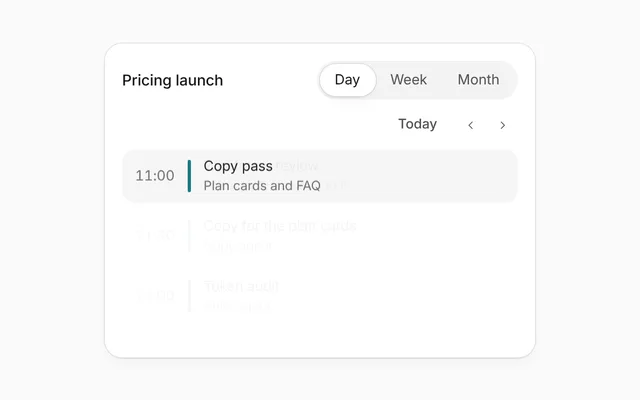
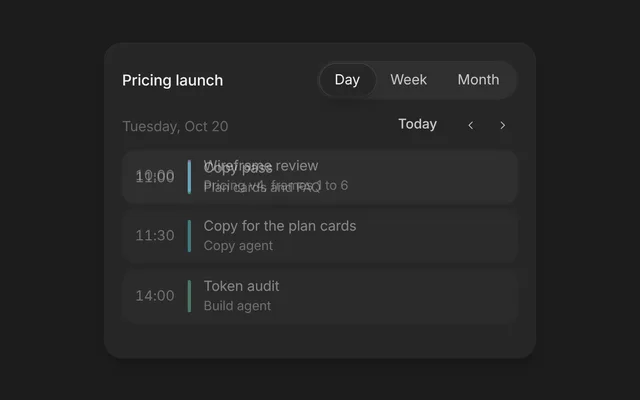
Today's schedule with a live now line and agent prep notes. Free and MIT licensed, as HTML or a typed React component, in two styles with light and dark mode.
Install
Add it to your project with the CLI.
HTML, CSS and JavaScript
npx designme add agendaReact
npx designme add agenda --reactThe CLI copies the source into your project, so you own it and can change anything. The HTML version lands in ./designme with the shared core and a demo.html. The React version lands in src/components/designme and needs React 19; it works in Next.js, Vite and Astro.
About
What it is for and what it does.
Agenda lists today's events in time order, with a line that marks where now falls in the day. When a person opens an event, the notes the agent prepared for it slide in underneath, along with an optional action such as joining the call. It suits an assistant that gets people ready for their meetings.
- When an assistant prepares briefing notes before each meeting
- When a home screen should show what is left of today at a glance
- When a person needs a join or open button next to the context for a call
- When past events should stay visible but step back from the ones still to come
- Each row shows the time, title, a quiet detail line and avatars for the people attending.
- Items marked
pastfade back, and the now line with thenowtime sits right after the last past item. - Opening an item reveals its
notesone by one; items without notes do not open. - An
actionadds a pill at the end of the notes, like "Join in 48 min", that calls its ownonClickwithout closing the row. - Only one item is open at a time, and you can control which with
openandonOpenChangeor let each row toggle itself. - The corner tag counts the events for you unless you pass your own
counttext.
- Each event is a native button, so it is reachable with Tab and opens with Enter or Space.
- Events that have notes carry
aria-expanded, which reports whether their notes are open. - Attendee avatars are marked
aria-hidden, so screen readers skip the initials.
Usage
Import it and drive it from your own state.
Import
import { Agenda } from '@/components/designme/agenda/Agenda';Example
The demo above as a React component, 29 lines you can copy.
'use client';
// The animated preview from designme.dev, rebuilt from the React component: an example of driving it from your own state.
import { useRef, useState } from 'react';
import { Agenda, type AgendaItem } from './Agenda';
import { useStory } from '../lib/useScript';

const P = {
  MK: { initials: 'MK', color: 'var(--dm-av-l)' }, JO: { initials: 'JO', color: 'var(--dm-av-m)' }, AR: { initials: 'AR', color: 'var(--dm-av-p)' },
  SL: { initials: 'SL', color: 'var(--dm-av-t)' }, DK: { initials: 'DK', color: 'var(--dm-av-b)' }
};
const ITEMS: AgendaItem[] = [
  { key: 'standup', time: '9:00', title: 'Standup', detail: '15 min, Design team', people: [P.MK, P.JO, P.AR], past: true },
  { key: 'demo', time: '11:30', title: 'Agent demo', detail: '30 min, Zoom', people: [P.SL, P.MK],
    notes: ['Demo flow: pricing audit, then the token export', 'Sam asked about cost limits last time, the cap is now $5'], action: { label: 'Join in 48 min' } },
  { key: 'pricing', time: '1:00', title: 'Pricing workshop', detail: '90 min, Room 4', people: [P.JO, P.AR, P.DK, P.MK],
    notes: ['Trial to paid is up 8.1 pts since Sep 18', 'Open question: show monthly price crossed out on mobile too?', '3 frames ready to review in Figma'] },
  { key: 'maya', time: '4:00', title: '1:1 with Maya', detail: '30 min', people: [P.MK],
    notes: ['She wanted feedback on the checkout copy', 'Library publish is waiting on her approval'] }
];

export default function AgendaDemo() {
  const [open, setOpen] = useState<string | null>(null);
  // a moment in, the agent opens its notes for the next big meeting
  // the preview opens one meeting on its own, unless you take over first
  const ref = useRef<HTMLDivElement>(null);
  useStory(ref, async ({ wait }) => { await wait(1000); setOpen('pricing'); });
  return <div ref={ref} style={{ width: '100%' }}><Agenda items={ITEMS} subtitle="Monday, Oct 19" now="10:42" open={open} onOpenChange={setOpen} /></div>;
}
Props
Everything Agenda takes.
| Prop | Type | What it does |
|---|---|---|
itemsrequired | AgendaItem[] | |
title | string | Like "Today" |
subtitle | string | Under the title, like "Monday, Oct 19" |
count | string | The tag in the corner. Defaults to "4 events" |
now | string | The time on the now line, like "10:42". Leave it out for no line |
open | string | null | The item whose notes are open, by key. Leave it out to let each item toggle |
defaultOpen | string | null | |
onOpenChange | (key: string | null) => void | |
className | string |
Code
The full source, as the CLI installs it.
Agenda.tsxReact · 101 lines
'use client';
import type { ReactNode } from 'react';
import { cx } from '../lib/cx';
import { useControllable } from '../lib/hooks';
import { Icon } from '../lib/icons';
import { Avatar, enter } from '../lib/motion';
import '../designme.css';
import './agenda.css';

export interface AgendaPerson {
  /** Like "MK" */
  initials: string;
  /** The avatar's colour, like 'var(--dm-av-l)' */
  color: string;
}

export interface AgendaItem {
  /** Identifies the item for `open`. Defaults to its title */
  key?: string;
  /** Like "11:30" */
  time: string;
  /** Like "Agent demo" */
  title: string;
  /** The quiet line under the title, like "30 min, Zoom" */
  detail?: string;
  people?: AgendaPerson[];
  /** Already over: the item fades back, and the now line sits after the last one */
  past?: boolean;
  /** What the agent prepared, shown when the item opens. Items without notes don't open */
  notes?: ReactNode[];
  /** A button at the end of the notes, like "Join in 48 min" */
  action?: { label: string; onClick?: () => void };
}

export interface AgendaProps {
  items: AgendaItem[];
  /** Like "Today" */
  title?: string;
  /** Under the title, like "Monday, Oct 19" */
  subtitle?: string;
  /** The tag in the corner. Defaults to "4 events" */
  count?: string;
  /** The time on the now line, like "10:42". Leave it out for no line */
  now?: string;
  /** The item whose notes are open, by key. Leave it out to let each item toggle */
  open?: string | null;
  defaultOpen?: string | null;
  onOpenChange?: (key: string | null) => void;
  className?: string;
}

const keyOf = (item: AgendaItem) => item.key ?? item.title;

/** Today's events in order, with a line for now. Open one to see what the agent prepared for it. */
export function Agenda({ items, title = 'Today', subtitle, count, now, open, defaultOpen = null, onOpenChange, className }: AgendaProps) {
  const [opened, setOpened] = useControllable(open, defaultOpen, onOpenChange);
  // the now line goes after the last item that is over
  const lastPast = items.reduce((at, item, i) => item.past ? i : at, -1);
  // rows and the now line stagger in together, in the order they sit
  let n = 0;
  const row = (item: AgendaItem) => {
    const k = keyOf(item), isOpen = opened === k && !!item.notes?.length;
    const notes = item.notes ?? [];
    return (
      <button key={k} type="button" className={cx('dm-agx-e', item.past && 'dm-past', isOpen && 'dm-open', enter().className)} style={enter(n++ * 60).style}
        aria-expanded={notes.length ? isOpen : undefined} onClick={() => setOpened(isOpen || !notes.length ? null : k)}>
        <span className="dm-tm dm-num">{item.time}</span>
        <span className="dm-bar" />
        <span className="dm-t">
          <b>{item.title}</b>
          {item.detail && <span>{item.detail}</span>}
          {item.people?.length ? <span className="dm-who">{item.people.map((p, j) => <Avatar key={j} initials={p.initials} color={p.color} />)}</span> : null}
        </span>
        {isOpen && (
          <div className="dm-agx-prep">
            {notes.map((t, j) => <div key={j} {...enter(j * 60)}><Icon name="spark" size="xs" /><span>{t}</span></div>)}
            {item.action && <span className="dm-pill dm-accent dm-sm dm-agx-join dm-enter" style={enter(notes.length * 60).style}
              onClick={e => { if (item.action?.onClick) { e.stopPropagation(); item.action.onClick(); } }}>{item.action.label}</span>}
          </div>
        )}
      </button>
    );
  };

  return (
    <div data-dm="" className={cx('dm-agx dm-panel', className)}>
      <div className="dm-agx-h">
        <div><b>{title}</b>{subtitle && <span className="dm-muted">{subtitle}</span>}</div>
        <span className="dm-tag dm-b">{count ?? `${items.length} ${items.length === 1 ? 'event' : 'events'}`}</span>
      </div>
      <div className="dm-agx-list">
        {items.flatMap((item, i) => {
          const out = [row(item)];
          if (now && i === lastPast) out.push(<div key="now" className="dm-agx-now dm-enter" style={enter(n++ * 60).style}><i />{now}</div>);
          return out;
        })}
      </div>
    </div>
  );
}
agenda.cssReact · 31 lines
/* Generated from designme.dev by scripts/sync.mjs. Edit the site, then sync. */
/* ---------- Agenda ---------- */
.dm-agx{padding:var(--dm-s-3);display:flex;flex-direction:column;gap:var(--dm-s-2)}
.dm-agx-h{display:flex;align-items:center;justify-content:space-between;padding:2px var(--dm-s-1)}
.dm-agx-h>div{display:flex;flex-direction:column;font-size:13.5px}
.dm-agx-h b{font-weight:500}
.dm-agx-h .dm-muted{font-size:12px}
.dm-agx-list{display:flex;flex-direction:column;gap:var(--dm-s-1);position:relative}
.dm-agx-e{display:grid;grid-template-columns:52px 3px 1fr;gap:10px;padding:var(--dm-s-2) 6px;border-radius:10px;text-align:left;width:100%;transition:background .2s,opacity .3s}
@media (hover:hover) and (pointer:fine){.dm-agx-e:hover{background:var(--dm-row)}}
/* the open event needs no fill of its own: it sits on the panel's white and its prep notes show it is open */
.dm-agx-e.dm-open{background:var(--dm-surface)}
@media (hover:hover) and (pointer:fine){.dm-agx-e.dm-open:hover{background:var(--dm-surface)}}
/* a past event: its title steps down to muted and its bar fades, the text stays readable */
.dm-agx-e.dm-past .dm-t b{color:var(--dm-muted)}.dm-agx-e.dm-past .dm-bar{opacity:.5}
.dm-agx-e .dm-tm{font-size:12px;color:var(--dm-muted);padding-top:1px}
.dm-agx-e .dm-bar{border-radius:2px;background:var(--dm-accent-mark,var(--dm-accent))}
.dm-agx-e .dm-t{display:flex;flex-direction:column;font-size:13px;min-width:0}
.dm-agx-e .dm-t b{font-weight:500}
.dm-agx-e .dm-t span{font-size:12px;color:var(--dm-muted)}
.dm-agx-e .dm-who{display:flex;margin-top:6px}
.dm-agx-e .dm-who .dm-av{width:20px;height:20px;font-size:8.5px;color:#fff;margin-right:-2px;box-shadow:0 0 0 1.5px var(--dm-surface)}
.dm-agx-prep{grid-column:3;font-size:12.5px;line-height:1.5;color:var(--dm-fg2);display:flex;flex-direction:column;gap:5px;padding-top:var(--dm-s-2)}
.dm-agx-prep div{display:flex;gap:7px;align-items:flex-start}
.dm-agx-prep svg{color:var(--dm-accent-fg,var(--dm-accent));margin-top:3px;flex:none}
.dm-agx-now{display:flex;align-items:center;gap:6px;margin:2px 0;font-size:11px;color:var(--dm-accent-fg,var(--dm-accent));font-weight:500;padding-left:6px}
.dm-agx-now::after{content:"";flex:1;height:2px;background:var(--dm-accent-mark,var(--dm-accent));border-radius:1px}
.dm-agx-now i{width:7px;height:7px;border-radius:50%;background:var(--dm-accent-mark,var(--dm-accent));animation:dm-agnow 2s ease-in-out infinite}
@keyframes dm-agnow{50%{box-shadow:0 0 0 5px var(--dm-accent-bg)}}
.dm-agx-join{margin-top:var(--dm-s-2);align-self:flex-start}
agenda.htmlHTML · 9 lines
<div class="card wide" data-c="agenda">
  <div class="stage-in">
    <div class="agx panel">
      <div class="agx-h"><div><b>Today</b><span class="muted">Monday, Oct 19</span></div><span class="tag b agx-n">4 events</span></div>
      <div class="agx-list"></div>
    </div>
  </div>
</div>
agenda.cssHTML · 30 lines
/* ---------- Agenda ---------- */
.agx{padding:var(--s-3);display:flex;flex-direction:column;gap:var(--s-2)}
.agx-h{display:flex;align-items:center;justify-content:space-between;padding:2px var(--s-1)}
.agx-h>div{display:flex;flex-direction:column;font-size:13.5px}
.agx-h b{font-weight:500}
.agx-h .muted{font-size:12px}
.agx-list{display:flex;flex-direction:column;gap:var(--s-1);position:relative}
.agx-e{display:grid;grid-template-columns:52px 3px 1fr;gap:10px;padding:var(--s-2) 6px;border-radius:10px;text-align:left;width:100%;transition:background .2s,opacity .3s}
@media (hover:hover) and (pointer:fine){.agx-e:hover{background:var(--row)}}
/* the open event needs no fill of its own: it sits on the panel's white and its prep notes show it is open */
.agx-e.open{background:var(--surface)}
@media (hover:hover) and (pointer:fine){.agx-e.open:hover{background:var(--surface)}}
/* a past event: its title steps down to muted and its bar fades, the text stays readable */
.agx-e.past .t b{color:var(--muted)}.agx-e.past .bar{opacity:.5}
.agx-e .tm{font-size:12px;color:var(--muted);padding-top:1px}
.agx-e .bar{border-radius:2px;background:var(--accent-mark,var(--accent))}
.agx-e .t{display:flex;flex-direction:column;font-size:13px;min-width:0}
.agx-e .t b{font-weight:500}
.agx-e .t span{font-size:12px;color:var(--muted)}
.agx-e .who{display:flex;margin-top:6px}
.agx-e .who .av{width:20px;height:20px;font-size:8.5px;color:#fff;margin-right:-2px;box-shadow:0 0 0 1.5px var(--surface)}
.agx-prep{grid-column:3;font-size:12.5px;line-height:1.5;color:var(--fg2);display:flex;flex-direction:column;gap:5px;padding-top:var(--s-2)}
.agx-prep div{display:flex;gap:7px;align-items:flex-start}
.agx-prep svg{color:var(--accent-fg,var(--accent));margin-top:3px;flex:none}
.agx-now{display:flex;align-items:center;gap:6px;margin:2px 0;font-size:11px;color:var(--accent-fg,var(--accent));font-weight:500;padding-left:6px}
.agx-now::after{content:"";flex:1;height:2px;background:var(--accent-mark,var(--accent));border-radius:1px}
.agx-now i{width:7px;height:7px;border-radius:50%;background:var(--accent-mark,var(--accent));animation:agnow 2s ease-in-out infinite}
@keyframes agnow{50%{box-shadow:0 0 0 5px var(--accent-bg)}}
.agx-join{margin-top:var(--s-2);align-self:flex-start}
agenda.jsHTML · 23 lines
DM.def('agenda', (r, c) => {
  const E = [
    ['9:00','Standup','15 min, Design team','b',[['MK','var(--av-l)'],['JO','var(--av-m)'],['AR','var(--av-p)']],null,1],
    ['11:30','Agent demo','30 min, Zoom','y',[['SL','var(--av-t)'],['MK','var(--av-l)']],['Demo flow: pricing audit, then the token export','Sam asked about cost limits last time, the cap is now $5'],0],
    ['1:00','Pricing workshop','90 min, Room 4','p',[['JO','var(--av-m)'],['AR','var(--av-p)'],['DK','var(--av-b)'],['MK','var(--av-l)']],['Trial to paid is up 8.1 pts since Sep 18','Open question: show monthly price crossed out on mobile too?','3 frames ready to review in Figma'],0],
    ['4:00','1:1 with Maya','30 min','l',[['MK','var(--av-l)']],['She wanted feedback on the checkout copy','Library publish is waiting on her approval'],0]
  ];
  const list = $('.agx-list', r);
  list.innerHTML = E.map((e, i) => `<button class="agx-e${e[6] ? ' past' : ''}" data-i="${i}"><span class="tm num">${e[0]}</span><span class="bar"></span><span class="t"><b>${e[1]}</b><span>${e[2]}</span><span class="who">${e[4].map(a => AV(a[0], a[1])).join('')}</span></span></button>`).join('');
  const rows = $$('.agx-e', list);
  rows[0].after(html('<div class="agx-now"><i></i>10:42</div>'));
  stagger([...list.children], 60);
  rows.forEach((el, i) => el.onclick = () => {
    const open = el.classList.contains('open'); rows.forEach(x => { x.classList.remove('open'); $('.agx-prep', x)?.remove(); });
    if (open || !E[i][5]) return;
    el.classList.add('open');
    const p = html(`<div class="agx-prep">${E[i][5].map(t => `<div>${I('spark','xs')}<span>${t}</span></div>`).join('')}${i === 1 ? '<span class="pill accent sm agx-join">Join in 48 min</span>' : ''}</div>`);
    el.appendChild(p); stagger([...p.children], 60);
  });
  // the preview opens one meeting on its own, unless you take over first
  c.auto(1000, () => rows[2].click());
});
Questions
What people ask about it.
- How do I have the agent open its notes for the next meeting on its own?
- Control the component with
openandonOpenChange, then setopento that item's key when the agent is ready. The example on this page does exactly that a moment after it loads. - Where does the now line go?
- It goes after the last item marked
past, labelled with thenowstring you pass. Leavenowout and no line is drawn. - Can the notes contain links or formatted text?
- Yes.
notesis an array of React nodes, so each note can be plain text or your own markup. Each note gets a small spark icon in front.
More in Dates
Pickers for single dates and date ranges.