ConversationComposer
Built by DesignMe, free to use under the MIT licence.
Expert design and dev support for startups and enterprises.
Book a callComposer
Message input with attachments, what to work on, a mode and dictation. Free and MIT licensed, as HTML or a typed React component, in two styles with light and dark mode.
Install
Add it to your project with the CLI.
HTML, CSS and JavaScript
npx designme add composerReact
npx designme add composer --reactThe CLI copies the source into your project, so you own it and can change anything. The HTML version lands in ./designme with the shared core and a demo.html. The React version lands in src/components/designme and needs React 19; it works in Next.js, Vite and Astro.
About
What it is for and what it does.
Composer is the box where a person writes a task for a design or coding agent and sends it. Besides the text, it lets them attach files and frames, pick what the agent works on, choose what the agent may do (ask, edit or plan), and dictate instead of typing.
- When a message often comes with files, frames or screenshots that should travel with it, and some of them take a moment to load.
- When the agent can work on more than one file or project and people should see, and change, which one it is on.
- When people should decide up front whether the agent only answers, makes changes, or writes a plan first.
- When people should be able to stop the agent while it answers, from the same button they used to send.
- The text box grows as you type, up to 160px. Enter sends, Shift+Enter adds a new line, and
onSubmitreceives the trimmed text and the attachments before the box clears. - Attachments show as chips above the text. A chip can be loading, with a spinner, or failed, in red with a Try again button that calls
onRetry. Send waits until every attachment has loaded. - The attach menu lists
addOptions, which default to a file, a Figma frame and a screenshot, and callsonAddwith the one picked. - A chip in the toolbar shows what the agent works on, from
contexts, and opens a menu to switch it. It only shows when you passcontexts. - The mode chip picks what the agent may do from
modes, which default to Ask (answer only, change nothing), Edit (change frames on a new page) and Plan (propose steps before it starts).toolsadds your own controls just before it. - While
busyis true, the Send button becomes a Stop button that callsonStop. - When
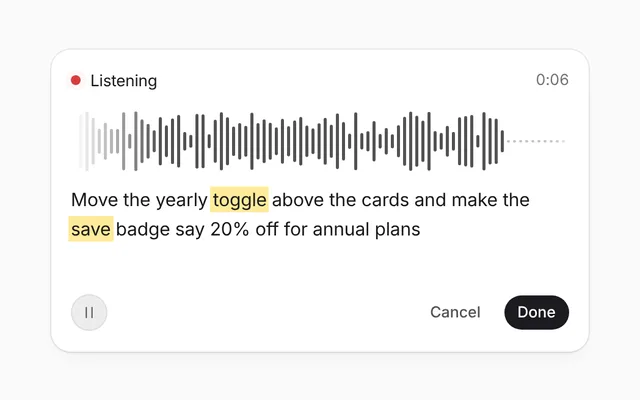
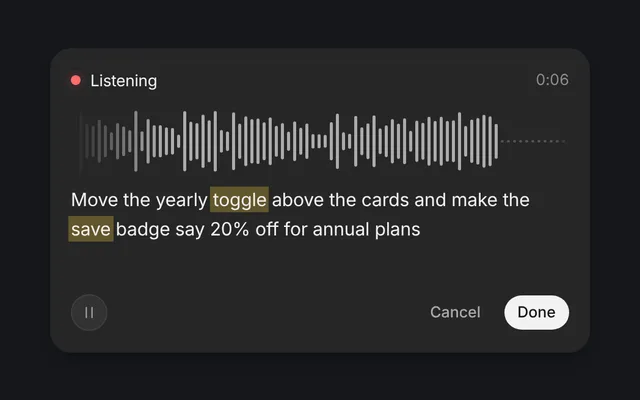
onDictateis set, a microphone button appears. Withdictatingon, the toolbar shows a red dot, Listening and a clock, with Cancel to restore the earlier text and Done to keep what was heard.
- The menus use
role="menu", the Working on and mode menus mark the current pick withmenuitemradioandaria-checked, and each button that opens a menu reportsaria-expanded. - From the keyboard, Enter, Space or the down arrow opens a menu with the focus on its picked item, or its first (the up arrow, on its last); the arrow keys move through it and wrap, Home and End jump to the ends, Tab closes it and moves on, and closing it gives the focus back to its button.
- Escape or a click outside closes an open menu, and Escape in the text box cancels dictation.
- Each attachment's remove button is labelled with its name, and a failed attachment's retry button is labelled Try again.
- The thread area above the box is an
aria-live="polite"region.
Usage
Import it and drive it from your own state.
Import
import { Composer } from '@/components/designme/composer/Composer';Example
The demo above as a React component, 95 lines you can copy.
'use client';
// The animated preview from designme.dev, rebuilt from the React component: an example of driving it from your own state.
import { useEffect, useRef, useState } from 'react';
import { Composer, type ComposerAttachment } from './Composer';
import { Icon, type IconName } from '../lib/icons';
import { Think } from '../lib/motion';
import { useScript, useStory, type Script } from '../lib/useScript';

/* ---------- Composer: attach a frame that won't open, try again, write the ask, switch to Edit, send and get a reply ---------- */
const ADDS: Record<string, [IconName, string]> = { file: ['file-text', 'Spacing notes.pdf'], figma: ['figma', 'Pricing / Desktop'], shot: ['image', 'Screenshot 10.42'] };
const CONTEXTS = [
  { value: 'Pricing v4', detail: 'Figma, 6 frames', icon: 'figma' as const },
  { value: 'Checkout flow', detail: 'Figma, 4 frames', icon: 'figma' as const },
  { value: 'Marketing site', detail: 'Code, main branch', icon: 'code' as const }
];
// the page can't use a microphone, so dictation plays this sample
const SAID = 'Tighten the spacing on the plan cards and keep the buttons the same height';
const REPLY: Record<string, (ctx: string) => string> = {
  ask: ctx => `Looking at ${ctx}. I won't change anything.`,
  edit: ctx => `On it. I'll make the changes on a new page in ${ctx}.`,
  plan: ctx => `I'll write a plan for ${ctx} first, then wait for you.`
};

type Msg = { id: number; from: 'you' | 'agent'; text: string; files?: string[]; working?: boolean };

export default function ComposerDemo() {
  const ref = useRef<HTMLDivElement>(null);
  const [text, setText] = useState('');
  const [files, setFiles] = useState<ComposerAttachment[]>([]);
  const [ctx, setCtx] = useState('Pricing v4');
  const [mode, setMode] = useState('ask');
  const [thread, setThread] = useState<Msg[]>([]);
  const [dictating, setDictating] = useState(false);
  const script = useRef<Script>(null), take = useRef(0), ids = useRef(0), tries = useRef(0);
  useScript(async s => { script.current = s; });
  const live = useRef({ ctx, mode });
  useEffect(() => { live.current = { ctx, mode }; });

  // a file loads before it can be sent; the first Figma link can't be opened, and Try again fetches it
  const load = (key: string, kind: string) => {
    const fail = kind === 'figma' && tries.current++ === 0;
    setFiles(f => f.map(x => x.key === key ? { ...x, status: 'loading', label: ADDS[kind][1] } : x));
    script.current?.wait(1000).then(() => setFiles(f => f.map(x => x.key === key ? { ...x, status: fail ? 'error' : 'ready', label: fail ? ADDS[kind][1] + " can't be opened" : ADDS[kind][1] } : x)));
  };
  const add = (kind: string) => { const key = kind + ++ids.current; setFiles(f => [...f, { key, icon: ADDS[kind][0], label: ADDS[kind][1], status: 'loading' }]); load(key, kind); };

  const dictate = async () => {
    const s = script.current; if (!s) return;
    const mine = ++take.current;
    setDictating(true);
    await s.wait(700);
    for (const w of SAID.split(' ')) { if (take.current !== mine) return; setText(t => t + (t ? ' ' : '') + w); await s.wait(160 + Math.random() * 120); }
  };
  const send = ({ text: said, attachments }: { text: string; attachments: ComposerAttachment[] }) => {
    const you: Msg = { id: ++ids.current, from: 'you', text: said, files: attachments.map(a => a.label) };
    const agent: Msg = { id: ++ids.current, from: 'agent', text: 'Working', working: true };
    setThread(t => [...t, you, agent].slice(-4));
    const answer = REPLY[live.current.mode](live.current.ctx);
    script.current?.wait(1700).then(() => setThread(t => t.map(m => m.id === agent.id ? { ...m, text: answer, working: false } : m)));
  };

  // the preview's story: the person attaches a frame, it won't open, they try again, write the ask, switch to Edit and send
  // taking over while it writes takes the words back
  useStory(ref, async ({ wait, press, taken }) => {
    await wait(1500); add('figma');
    await wait(2500); press('.dm-rt');
    await wait(1500);
    let writing = true;
    taken(() => { if (writing) setText(''); });
    for (const w of 'Tighten the spacing on the plan cards'.split(' ')) { setText(t => t + (t ? ' ' : '') + w); await wait(150); }
    writing = false;
    await wait(1000); press('.dm-cpx-mode');
    await wait(1500); press('.dm-pp-mode .dm-mi:nth-of-type(2)');
    await wait(1000); press('.dm-cpx-send');
  });

  return (
    <div ref={ref} style={{ width: '100%' }}>
      <Composer value={text} onValueChange={setText} onSubmit={send}
        attachments={files} onAttachmentsChange={setFiles} onAdd={add}
        onRetry={key => { const f = files.find(x => x.key === key); if (f) load(key, f.key.replace(/\d+$/, '')); }}
        contexts={CONTEXTS} context={ctx} onContextChange={setCtx} mode={mode} onModeChange={setMode}
        onDictate={dictate} dictating={dictating} onDictationEnd={() => { take.current++; setDictating(false); }}
        thread={thread.map(m => m.from === 'you'
          ? <div key={m.id} className="dm-bub dm-enter">
              {m.files?.length ? <div style={{ display: 'flex', gap: 6, flexWrap: 'wrap', marginBottom: m.text ? 6 : 0 }}>{m.files.map((f, i) => <span key={i} className="dm-fchip"><Icon name="clip" size="xs" />{f}</span>)}</div> : null}
              {m.text}
            </div>
          : <div key={m.id + (m.working ? 'w' : 'd')} className="dm-cpx-ag dm-enter">
              {m.working ? <><Think /><span className="dm-shim">{m.text}</span></> : <span>{m.text}</span>}
            </div>)} />
    </div>
  );
}
Props
Everything Composer takes.
| Prop | Type | What it does |
|---|---|---|
value | string | The text in the box. Leave it out to let the composer keep it |
defaultValue | string | |
onValueChange | (value: string) => void | |
placeholder | string | |
onSubmit | (message: { text: string; attachments: ComposerAttachment[] }) => void | Called with the message when the person sends it. The box clears itself afterwards |
busy | boolean | The agent is answering: send turns into stop |
onStop | () => void | Called by the stop button while busy |
thread | ReactNode | The conversation above the box, like the bubbles a message turns into |
attachments | ComposerAttachment[] | Files and frames added to the message, shown as chips above the text |
defaultAttachments | ComposerAttachment[] | |
onAttachmentsChange | (attachments: ComposerAttachment[]) => void | |
addOptions | ComposerOption[] | What the attach menu offers. Defaults to a file, a Figma frame and a screenshot |
onAdd | (value: string) => void | Called with the option's value when the person picks one from the attach menu |
onRetry | (key: string) => void | Called by Try again on an attachment that failed to load |
contexts | ComposerOption[] | What the agent can work on, like Figma files and repositories. The chip only shows when there are some |
context | string | |
defaultContext | string | |
onContextChange | (context: string) => void | |
modes | ComposerOption[] | What the agent may do. Defaults to Ask, Edit and Plan |
mode | string | |
defaultMode | string | |
onModeChange | (mode: string) => void | |
tools | ReactNode | More in the toolbar, before the mode, like a context ring |
onDictate | () => void | Called by the microphone button. Start listening and set dictating; the mic button only shows when this is set |
dictating | boolean | Swaps the toolbar for a red dot, a clock, Cancel and Done. Write what you hear into value while it is on |
dictationSeconds | number | Seconds to show while dictating. Leave it out to let it count |
onDictationEnd | (keep: boolean) => void | Called by Cancel (false, the text goes back to what it was) or Done (true, the text stays) |
className | string |
Code
The full source, as the CLI installs it.
Composer.tsxReact · 244 lines
'use client';
import { useEffect, useRef, useState, type CSSProperties, type ReactNode } from 'react';
import { cx } from '../lib/cx';
import { useControllable, useIsoLayoutEffect, useSeconds } from '../lib/hooks';
import { Icon, type IconName } from '../lib/icons';
import { Spin, Swap, Tip } from '../lib/motion';
import { focusMenu, menuStep } from '../lib/popover';
import '../designme.css';
import './composer.css';

export interface ComposerAttachment {
  key: string;
  label: string;
  /** Defaults to a paper clip */
  icon?: IconName;
  /** loading shows a spinner and holds Send until it's ready; error shows the chip in red with a Try again button */
  status?: 'loading' | 'error' | 'ready';
}
export interface ComposerOption {
  value: string;
  /** Defaults to the value */
  label?: string;
  /** The quiet line under the label */
  detail?: string;
  icon?: IconName;
}

export interface ComposerProps {
  /** The text in the box. Leave it out to let the composer keep it */
  value?: string;
  defaultValue?: string;
  onValueChange?: (value: string) => void;
  placeholder?: string;
  /** Called with the message when the person sends it. The box clears itself afterwards */
  onSubmit?: (message: { text: string; attachments: ComposerAttachment[] }) => void;
  /** The agent is answering: send turns into stop */
  busy?: boolean;
  /** Called by the stop button while busy */
  onStop?: () => void;
  /** The conversation above the box, like the bubbles a message turns into */
  thread?: ReactNode;

  /** Files and frames added to the message, shown as chips above the text */
  attachments?: ComposerAttachment[];
  defaultAttachments?: ComposerAttachment[];
  onAttachmentsChange?: (attachments: ComposerAttachment[]) => void;
  /** What the attach menu offers. Defaults to a file, a Figma frame and a screenshot */
  addOptions?: ComposerOption[];
  /** Called with the option's value when the person picks one from the attach menu */
  onAdd?: (value: string) => void;
  /** Called by Try again on an attachment that failed to load */
  onRetry?: (key: string) => void;

  /** What the agent can work on, like Figma files and repositories. The chip only shows when there are some */
  contexts?: ComposerOption[];
  context?: string;
  defaultContext?: string;
  onContextChange?: (context: string) => void;
  /** What the agent may do. Defaults to Ask, Edit and Plan */
  modes?: ComposerOption[];
  mode?: string;
  defaultMode?: string;
  onModeChange?: (mode: string) => void;
  /** More in the toolbar, before the mode, like a context ring */
  tools?: ReactNode;

  /** Called by the microphone button. Start listening and set dictating; the mic button only shows when this is set */
  onDictate?: () => void;
  /** Swaps the toolbar for a red dot, a clock, Cancel and Done. Write what you hear into value while it is on */
  dictating?: boolean;
  /** Seconds to show while dictating. Leave it out to let it count */
  dictationSeconds?: number;
  /** Called by Cancel (false, the text goes back to what it was) or Done (true, the text stays) */
  onDictationEnd?: (keep: boolean) => void;
  className?: string;
}

const ADD: ComposerOption[] = [
  { value: 'file', label: 'Upload a file', detail: 'Images, PDFs or code', icon: 'file-text' },
  { value: 'figma', label: 'Link a Figma frame', detail: 'From any file you can open', icon: 'figma' },
  { value: 'shot', label: 'Add a screenshot', detail: "Of the window you're in", icon: 'image' }
];
const MODES: ComposerOption[] = [
  { value: 'ask', label: 'Ask', detail: 'Answer only, change nothing', icon: 'eye' },
  { value: 'edit', label: 'Edit', detail: 'Change frames on a new page', icon: 'edit' },
  { value: 'plan', label: 'Plan', detail: 'Propose steps before it starts', icon: 'list' }
];
const PLACEHOLDER = 'Ask the design agent, or attach a frame';

type PopName = 'plus' | 'ctx' | 'mode';
const Check = () => <span className="dm-ck"><Icon name="check" /></span>;
const clock = (s: number) => Math.floor(s / 60) + ':' + String(s % 60).padStart(2, '0');

/** The message box: text that grows as you type, attachments that load, what the agent works on, what it may do, dictation and send. */
export function Composer({
  value, defaultValue = '', onValueChange, placeholder = PLACEHOLDER, onSubmit, busy = false, onStop, thread,
  attachments, defaultAttachments = [], onAttachmentsChange, addOptions = ADD, onAdd, onRetry,
  contexts, context, defaultContext, onContextChange, modes = MODES, mode, defaultMode, onModeChange, tools,
  onDictate, dictating = false, dictationSeconds, onDictationEnd, className
}: ComposerProps) {
  const [text, setText] = useControllable(value, defaultValue, onValueChange);
  const [files, setFiles] = useControllable(attachments, defaultAttachments, onAttachmentsChange);
  const [ctx, setCtx] = useControllable(context, defaultContext ?? contexts?.[0]?.value ?? '', onContextChange);
  const [md, setMd] = useControllable(mode, defaultMode ?? modes[0]?.value ?? '', onModeChange);
  const ctxOpt = contexts?.find(o => o.value === ctx), mdOpt = modes.find(o => o.value === md) ?? modes[0];
  const counted = useSeconds(dictating && dictationSeconds === undefined);

  const box = useRef<HTMLDivElement>(null), ta = useRef<HTMLTextAreaElement>(null);
  // the text box grows with its text, up to 160px
  useIsoLayoutEffect(() => { const t = ta.current; if (!t) return; t.style.height = 'auto'; t.style.height = Math.min(t.scrollHeight, 160) + 'px'; }, [text, dictating]);

  /* ---------- menus: open above their button, close on a click outside, Escape or a pick ---------- */
  const [pop, setPop] = useState<PopName | null>(null);
  const [place, setPlace] = useState<Partial<Record<PopName, CSSProperties>>>({});
  const triggers = useRef<Partial<Record<PopName, HTMLButtonElement | null>>>({});
  const pops = useRef<Partial<Record<PopName, HTMLDivElement | null>>>({});
  const pick = (fn: () => void) => () => { fn(); setTimeout(() => setPop(null), 120); };
  // the keyboard: Enter, Space or the down arrow opens a menu on its picked or first item (the up arrow, on its last), the
  // arrows move and wrap, Home and End jump, and Escape, Tab or a pick closes it with the focus back on its button
  const focusTo = useRef<'first' | 'last' | null>(null), inside = useRef<PopName | null>(null);
  useIsoLayoutEffect(() => {
    if (pop) { const to = focusTo.current, el = pops.current[pop]; focusTo.current = null; if (to && el) focusMenu(el, to); return; }
    if (inside.current) { const b = triggers.current[inside.current]; inside.current = null; b?.focus({ preventScroll: true }); }
  }, [pop]);
  useIsoLayoutEffect(() => {
    if (!pop) return;
    const btn = triggers.current[pop], el = pops.current[pop], host = box.current; if (!btn || !el || !host) return;
    // the mode sits near the right end of the bar, so its menu lines up with the button's right edge
    const hr = host.getBoundingClientRect(), br = btn.getBoundingClientRect(), end = pop === 'mode';
    let x = end ? br.right - hr.left - el.offsetWidth : br.left - hr.left;
    x = Math.max(-hr.left + 8, Math.min(x, innerWidth - hr.left - el.offsetWidth - 8));
    setPlace(p => ({ ...p, [pop]: { left: x, top: br.top - hr.top - el.offsetHeight - 6, '--dm-origin': 'bottom ' + (end ? 'right' : 'left') } as CSSProperties }));
  }, [pop]);
  useEffect(() => {
    if (!pop) return;
    const click = (e: MouseEvent) => { const t = e.target as Node; if (!pops.current[pop]?.contains(t) && !triggers.current[pop]?.contains(t)) setPop(null); };
    const key = (e: KeyboardEvent) => {
      const el = pops.current[pop], t = e.target as Node;
      if (e.key === 'Escape') { if (el?.contains(t)) inside.current = pop; setPop(null); return; }
      if (e.defaultPrevented || !el || !el.contains(t)) return;
      if (e.key === 'Tab') { triggers.current[pop]?.focus({ preventScroll: true }); inside.current = null; setPop(null); return; }
      const to = menuStep(el, e.key); if (to) { e.preventDefault(); to.focus({ preventScroll: true }); }
    };
    const track = (e: FocusEvent) => { inside.current = pops.current[pop]?.contains(e.target as Node) ? pop : null; };
    const resize = (e: UIEvent) => { if (e.isTrusted) setPop(null); };
    document.addEventListener('focusin', track);
    document.addEventListener('click', click); document.addEventListener('keydown', key); addEventListener('resize', resize);
    return () => { document.removeEventListener('click', click); document.removeEventListener('keydown', key); document.removeEventListener('focusin', track); removeEventListener('resize', resize); };
  }, [pop]);
  const trigger = (name: PopName) => ({
    ref: (el: HTMLButtonElement | null) => { triggers.current[name] = el; },
    'aria-expanded': pop === name, 'aria-haspopup': 'menu' as const,
    onClick: (e: { detail: number }) => { if (pop !== name && e.detail === 0) focusTo.current = 'first'; setPop(p => p === name ? null : name); },
    onKeyDown: (e: { key: string; preventDefault: () => void }) => {
      if (e.key !== 'ArrowDown' && e.key !== 'ArrowUp') return;
      e.preventDefault(); const where = e.key === 'ArrowUp' ? 'last' : 'first', el = pops.current[name];
      if (pop === name && el) focusMenu(el, where); else { focusTo.current = where; setPop(name); }
    }
  });
  const popProps = (name: PopName, cls: string) => ({
    ref: (el: HTMLDivElement | null) => { pops.current[name] = el; },
    className: cx('dm-pop', cls, pop === name && 'dm-open'), style: place[name], inert: pop !== name
  });

  /* ---------- attachments leave with a short fade before they go ---------- */
  const [leaving, setLeaving] = useState<string[]>([]);
  const latest = useRef(files);
  useEffect(() => { latest.current = files; });
  const remove = (key: string) => {
    setLeaving(l => [...l, key]);
    setTimeout(() => { setLeaving(l => l.filter(k => k !== key)); setFiles(latest.current.filter(f => f.key !== key)); }, 300);
  };

  /* ---------- dictation: what was there comes back on cancel ---------- */
  const before = useRef('');
  const wasDictating = useRef(dictating);
  useEffect(() => {
    if (dictating && !wasDictating.current) { before.current = text; setText(''); }
    wasDictating.current = dictating;
  }); // eslint-disable-line react-hooks/exhaustive-deps
  const endDictation = (keep: boolean) => { if (!keep) setText(before.current); onDictationEnd?.(keep); ta.current?.focus({ preventScroll: true }); };

  // send waits for text or a file, and for every file to finish loading
  const canSend = (!!text.trim() || files.length > 0) && !files.some(f => f.status === 'loading' || f.status === 'error');
  const submit = () => {
    if (!canSend || busy) return;
    onSubmit?.({ text: text.trim(), attachments: files });
    setText(''); setFiles([]);
  };

  return (
    <div data-dm="" className={cx('dm-cpx', className)}>
      <div className="dm-cpx-thread" aria-live="polite">{thread}</div>
      <div ref={box} className="dm-cpx-box" data-mode={dictating ? 'voice' : 'idle'}>
        <div className="dm-cpx-att">{files.map(f => (
          <span key={f.key} className={cx('dm-fchip', f.status === 'loading' && 'dm-ld', f.status === 'error' && 'dm-err', leaving.includes(f.key) ? 'dm-leave' : 'dm-enter')}>
            <span className="dm-ic" style={{ display: 'grid' }}>{f.status === 'loading' ? <Spin /> : <Icon name={f.status === 'error' ? 'alert' : f.icon ?? 'clip'} size="xs" />}</span>
            <Swap className="dm-n">{f.label}</Swap>
            {f.status === 'error' && onRetry && <Tip label="Try again"><button type="button" className="dm-rt" aria-label="Try again" onClick={() => onRetry(f.key)}><Icon name="refresh" size="xs" /></button></Tip>}
            <button type="button" className="dm-x" aria-label={'Remove ' + f.label} onClick={() => remove(f.key)}><Icon name="x" size="xs" /></button>
          </span>))}
        </div>
        <textarea ref={ta} className="dm-cpx-ta" rows={1} aria-label="Message" placeholder={dictating ? 'Listening…' : placeholder} value={text}
          onChange={e => setText(e.target.value)}
          onKeyDown={e => {
            if (e.key === 'Enter' && !e.shiftKey && !dictating) { e.preventDefault(); submit(); }
            if (e.key === 'Escape' && dictating) endDictation(false);
          }} />
        <div className="dm-cpx-rows">
          <div className="dm-cpx-bar" inert={dictating}>
            <Tip label="Attach a file or a frame" off={pop === 'plus'}><button type="button" className="dm-ib dm-cpx-add" aria-label="Attach" {...trigger('plus')}><Icon name="clip" /></button></Tip>
            {ctxOpt && <Tip label="What the agent works on" off={pop === 'ctx'}><button type="button" className="dm-chip dm-cpx-ctx" {...trigger('ctx')}><Icon name={ctxOpt.icon ?? 'folder'} /><Swap className="dm-cpx-ctx-n">{ctxOpt.label ?? ctxOpt.value}</Swap><Icon name="chev-d" size="xs" /></button></Tip>}
            <span className="dm-sp" />
            {tools}
            {mdOpt && <Tip label="What the agent may do" off={pop === 'mode'}><button type="button" className="dm-chip dm-cpx-mode" {...trigger('mode')}><Icon name={mdOpt.icon ?? 'edit'} /><Swap className="dm-cpx-mode-n">{mdOpt.label ?? mdOpt.value}</Swap><Icon name="chev-d" size="xs" /></button></Tip>}
            {onDictate && <Tip label="Dictate"><button type="button" className="dm-ib dm-cpx-mic" aria-label="Dictate" onClick={onDictate}><Icon name="mic" /></button></Tip>}
            {busy
              ? <Tip label="Stop"><button type="button" className="dm-cpx-send" aria-label="Stop" onClick={onStop}><Icon name="stop" /></button></Tip>
              : <Tip label="Send" kbd="↵"><button type="button" className="dm-cpx-send" aria-label="Send" disabled={!canSend} onClick={submit}><Icon name="up" /></button></Tip>}
          </div>
          <div className="dm-cpx-voice" inert={!dictating}>
            <span className="dm-cpx-rec"><span className="dm-cpx-dot" />Listening</span><span className="dm-cpx-tm dm-num dm-muted">{clock(dictationSeconds ?? counted)}</span>
            <span className="dm-sp" />
            <button type="button" className="dm-pill dm-ghost dm-sm dm-cpx-cancel" onClick={() => endDictation(false)}>Cancel</button>
            <button type="button" className="dm-pill dm-primary dm-sm dm-cpx-ok" onClick={() => endDictation(true)}>Done</button>
          </div>
        </div>

        <div role="menu" aria-label="Attach" {...popProps('plus', 'dm-pp-plus')}>
          {addOptions.map(o => <button key={o.value} type="button" role="menuitem" className="dm-mi" onClick={pick(() => onAdd?.(o.value))}><Icon name={o.icon ?? 'clip'} /><span>{o.label ?? o.value}{o.detail && <span className="dm-d">{o.detail}</span>}</span></button>)}
        </div>
        {contexts && contexts.length > 0 && <div role="menu" aria-label="Working on" {...popProps('ctx', 'dm-pp-ctx')}>
          <div className="dm-ph">Working on</div>
          {contexts.map(o => <button key={o.value} type="button" role="menuitemradio" aria-checked={o.value === ctx} className="dm-mi" onClick={pick(() => setCtx(o.value))}><Icon name={o.icon ?? 'folder'} /><span>{o.label ?? o.value}{o.detail && <span className="dm-d">{o.detail}</span>}</span><Check /></button>)}
        </div>}
        <div role="menu" aria-label="The agent may" {...popProps('mode', 'dm-pp-mode')}>
          <div className="dm-ph">The agent may</div>
          {modes.map(o => <button key={o.value} type="button" role="menuitemradio" aria-checked={o.value === md} className="dm-mi" onClick={pick(() => setMd(o.value))}><Icon name={o.icon ?? 'edit'} /><span>{o.label ?? o.value}{o.detail && <span className="dm-d">{o.detail}</span>}</span><Check /></button>)}
        </div>
      </div>
    </div>
  );
}
composer.cssReact · 51 lines
/* Generated from designme.dev by scripts/sync.mjs. Edit the site, then sync. */
/* ---------- Composer ---------- */
.dm-cpx{display:flex;flex-direction:column;justify-content:flex-end;gap:14px;overflow-anchor:none}
/* neither the composer nor the box it sits in anchors the page's scroll, so the page stays put as the thread grows and clears */
.dm-stage-in:has(>.dm-cpx){overflow-anchor:none}
/* on a card the composer keeps the room the conversation will take, with the box at its foot, so the box stays put */
.dm-stage-in>.dm-cpx{min-height:inherit}
.dm-cpx-thread{display:flex;flex-direction:column;gap:var(--dm-s-3)}
.dm-cpx-thread:empty{display:none}
.dm-cpx-ag{font-size:14px;color:var(--dm-fg2);display:flex;gap:var(--dm-s-2);align-items:center}
/* the composer is a component, not a field: a quiet hairline and a soft shadow, the same while you type in it */
.dm-cpx-box{position:relative;background:var(--dm-surface);border-radius:var(--dm-r-box);box-shadow:var(--dm-shadow);transition:box-shadow var(--dm-t-fast)}
@supports (corner-shape:squircle){.dm-cpx-box{corner-shape:squircle;border-radius:var(--dm-r-box-sq)}}
.dm-cpx-att{display:flex;gap:6px;flex-wrap:wrap;padding:var(--dm-s-3) 14px 0}
.dm-cpx-att:empty{display:none}
.dm-cpx-att .dm-fchip{transition:color .32s,background .32s}
.dm-cpx-att .dm-fchip .dm-x,.dm-cpx-att .dm-fchip .dm-rt{display:grid;place-items:center;width:18px;height:18px;border-radius:50%;margin-right:-4px;color:var(--dm-muted)}
@media (hover:hover) and (pointer:fine){.dm-cpx-att .dm-fchip .dm-x:hover,.dm-cpx-att .dm-fchip .dm-rt:hover{background:var(--dm-row);color:var(--dm-fg)}}
.dm-cpx-att .dm-fchip .dm-spin{width:10px;height:10px}
.dm-cpx-att .dm-fchip.dm-ld{color:var(--dm-muted)}
.dm-cpx-att .dm-fchip.dm-err{color:var(--dm-bad);background:var(--dm-bad-bg);box-shadow:none}
.dm-cpx-att .dm-fchip.dm-err .dm-rt{color:var(--dm-bad)}
.dm-cpx-ta{display:block;width:100%;border:0;outline:0;resize:none;background:none;color:var(--dm-fg);font:inherit;font-size:14px;line-height:1.5;padding:15px 17px var(--dm-s-1);min-height:54px;max-height:160px;transition:color .32s}
.dm-cpx-ta::placeholder{color:var(--dm-muted)}
.dm-cpx-box[data-mode="voice"] .dm-cpx-ta{color:var(--dm-fg2)}
.dm-cpx-rows{display:grid;padding:6px 10px 10px}
.dm-cpx-bar,.dm-cpx-voice{grid-area:1/1;display:flex;align-items:center;gap:var(--dm-s-1);min-width:0;transition:opacity .32s var(--dm-ease),transform .42s var(--dm-ease)}
.dm-cpx-voice{opacity:0;transform:translateY(6px);pointer-events:none;visibility:hidden;transition:opacity .32s var(--dm-ease),transform .42s var(--dm-ease),visibility 0s .32s}
.dm-cpx-box[data-mode="voice"] .dm-cpx-bar{opacity:0;transform:translateY(-6px);pointer-events:none}
.dm-cpx-box[data-mode="voice"] .dm-cpx-voice{opacity:1;transform:none;pointer-events:auto;visibility:visible;transition-delay:0s}
.dm-cpx-bar>.dm-ib{width:32px;height:32px;flex:none}
.dm-cpx-add[aria-expanded="true"]{background:var(--dm-chip);color:var(--dm-fg)}
.dm-cpx-bar .dm-chip{height:32px;padding:0 10px;gap:6px;background:none;min-width:0;font-size:13px;color:var(--dm-fg2)}
.dm-cpx-bar .dm-chip[aria-expanded="true"]{background:var(--dm-row);color:var(--dm-fg)}
@media (hover:hover) and (pointer:fine){.dm-cpx-bar .dm-chip:hover{background:var(--dm-row);color:var(--dm-fg)}}
.dm-cpx-bar .dm-chip>span{overflow:hidden;text-overflow:ellipsis;white-space:nowrap}
.dm-cpx-bar .dm-chip>svg:last-child{color:var(--dm-muted)}
.dm-cpx-send{width:32px;height:32px;border-radius:50%;display:grid;place-items:center;background:var(--dm-accent);color:var(--dm-on-accent);flex:none;transition:opacity .32s,transform .16s,background .16s}
@media (hover:hover) and (pointer:fine){.dm-cpx-send:hover{background:var(--dm-accent-2)}}
.dm-cpx-send:active{transform:scale(.92)}
.dm-cpx-send[disabled]{opacity:1;cursor:not-allowed;background:var(--dm-dis-hatch),var(--dm-dis-fill);color:var(--dm-dis);box-shadow:var(--dm-soft-ring)}
/* dictation: a red dot and a clock while it listens, the words arriving in the box, then Cancel or Done */
.dm-cpx-rec{display:inline-flex;align-items:center;gap:var(--dm-s-2);padding-left:var(--dm-s-2);font-size:13px;color:var(--dm-fg)}
.dm-cpx-dot{width:8px;height:8px;border-radius:50%;background:var(--dm-bad);animation:dm-cpxrec 1.6s var(--dm-ease-io) infinite}
@keyframes dm-cpxrec{50%{opacity:.35}}
.dm-cpx-tm{font-size:13px;margin-left:var(--dm-s-1)}
.dm-cpx-voice .dm-pill{flex:none}
.dm-pp-plus,.dm-pp-ctx,.dm-pp-mode{width:264px}
.dm-cpx-bar>.dm-cpx-send{flex:none}
@media (max-width:480px){.dm-cpx-bar .dm-cpx-ctx>span{max-width:88px}}
composer.htmlHTML · 45 lines
<div class="card" data-c="composer">
  <div class="stage-in">
    <div class="cpx">
      <div class="cpx-thread" aria-live="polite"></div>
      <div class="cpx-box" data-mode="idle">
        <div class="cpx-att"></div>
        <textarea class="cpx-ta" rows="1" aria-label="Message" placeholder="Ask the design agent, or attach a frame"></textarea>
        <div class="cpx-rows">
          <div class="cpx-bar">
            <button class="ib cpx-add" aria-label="Attach" data-tip="Attach a file or a frame" data-pop=".pp-plus" data-pop-pos="up"><svg class="i s"><use href="#i-clip"/></svg></button>
            <button class="chip cpx-ctx" data-pop=".pp-ctx" data-pop-pos="up" data-tip="What the agent works on"><svg class="i s"><use href="#i-figma"/></svg><span class="cpx-ctx-n">Pricing v4</span><svg class="i xs"><use href="#i-chev-d"/></svg></button>
            <span class="sp"></span>
            <button class="chip cpx-mode" data-pop=".pp-mode" data-pop-pos="up" data-pop-align="end" data-tip="What the agent may do"><svg class="i s"><use href="#i-eye"/></svg><span class="cpx-mode-n">Ask</span><svg class="i xs"><use href="#i-chev-d"/></svg></button>
            <button class="ib cpx-mic" aria-label="Dictate" data-tip="Dictate"><svg class="i s"><use href="#i-mic"/></svg></button>
            <button class="cpx-send" aria-label="Send" data-tip="Send" data-tip-k="↵" disabled><svg class="i s"><use href="#i-up"/></svg></button>
          </div>
          <div class="cpx-voice">
            <span class="cpx-rec"><span class="cpx-dot"></span>Listening</span><span class="cpx-tm num muted">0:00</span>
            <span class="sp"></span>
            <button class="pill ghost sm cpx-cancel">Cancel</button>
            <button class="pill primary sm cpx-ok">Done</button>
          </div>
        </div>
        <div class="pop pp-plus" role="menu">
          <button class="mi" data-close data-add="file"><svg class="i s"><use href="#i-file-text"/></svg><span>Upload a file<span class="d">Images, PDFs or code</span></span></button>
          <button class="mi" data-close data-add="figma"><svg class="i s"><use href="#i-figma"/></svg><span>Link a Figma frame<span class="d">From any file you can open</span></span></button>
          <button class="mi" data-close data-add="shot"><svg class="i s"><use href="#i-image"/></svg><span>Add a screenshot<span class="d">Of the window you're in</span></span></button>
        </div>
        <div class="pop pp-ctx" role="menu">
          <div class="ph">Working on</div>
          <button class="mi" role="menuitemradio" aria-checked="true" data-close data-ctx="Pricing v4" data-ic="figma"><svg class="i s"><use href="#i-figma"/></svg><span>Pricing v4<span class="d">Figma, 6 frames</span></span><span class="ck"><svg class="i s"><use href="#i-check"/></svg></span></button>
          <button class="mi" role="menuitemradio" aria-checked="false" data-close data-ctx="Checkout flow" data-ic="figma"><svg class="i s"><use href="#i-figma"/></svg><span>Checkout flow<span class="d">Figma, 4 frames</span></span><span class="ck"><svg class="i s"><use href="#i-check"/></svg></span></button>
          <button class="mi" role="menuitemradio" aria-checked="false" data-close data-ctx="Marketing site" data-ic="code"><svg class="i s"><use href="#i-code"/></svg><span>Marketing site<span class="d">Code, main branch</span></span><span class="ck"><svg class="i s"><use href="#i-check"/></svg></span></button>
        </div>
        <div class="pop pp-mode" role="menu">
          <div class="ph">The agent may</div>
          <button class="mi" role="menuitemradio" aria-checked="true" data-close data-mode="Ask" data-ic="eye"><svg class="i s"><use href="#i-eye"/></svg><span>Ask<span class="d">Answer only, change nothing</span></span><span class="ck"><svg class="i s"><use href="#i-check"/></svg></span></button>
          <button class="mi" role="menuitemradio" aria-checked="false" data-close data-mode="Edit" data-ic="edit"><svg class="i s"><use href="#i-edit"/></svg><span>Edit<span class="d">Change frames on a new page</span></span><span class="ck"><svg class="i s"><use href="#i-check"/></svg></span></button>
          <button class="mi" role="menuitemradio" aria-checked="false" data-close data-mode="Plan" data-ic="list"><svg class="i s"><use href="#i-list"/></svg><span>Plan<span class="d">Propose steps before it starts</span></span><span class="ck"><svg class="i s"><use href="#i-check"/></svg></span></button>
        </div>
      </div>
    </div>
  </div>
</div>
composer.cssHTML · 50 lines
/* ---------- Composer ---------- */
.cpx{display:flex;flex-direction:column;justify-content:flex-end;gap:14px;overflow-anchor:none}
/* neither the composer nor the box it sits in anchors the page's scroll, so the page stays put as the thread grows and clears */
.stage-in:has(>.cpx){overflow-anchor:none}
/* on a card the composer keeps the room the conversation will take, with the box at its foot, so the box stays put */
.stage-in>.cpx{min-height:inherit}
.cpx-thread{display:flex;flex-direction:column;gap:var(--s-3)}
.cpx-thread:empty{display:none}
.cpx-ag{font-size:14px;color:var(--fg2);display:flex;gap:var(--s-2);align-items:center}
/* the composer is a component, not a field: a quiet hairline and a soft shadow, the same while you type in it */
.cpx-box{position:relative;background:var(--surface);border-radius:var(--r-box);box-shadow:var(--shadow);transition:box-shadow var(--t-fast)}
@supports (corner-shape:squircle){.cpx-box{corner-shape:squircle;border-radius:var(--r-box-sq)}}
.cpx-att{display:flex;gap:6px;flex-wrap:wrap;padding:var(--s-3) 14px 0}
.cpx-att:empty{display:none}
.cpx-att .fchip{transition:color .32s,background .32s}
.cpx-att .fchip .x,.cpx-att .fchip .rt{display:grid;place-items:center;width:18px;height:18px;border-radius:50%;margin-right:-4px;color:var(--muted)}
@media (hover:hover) and (pointer:fine){.cpx-att .fchip .x:hover,.cpx-att .fchip .rt:hover{background:var(--row);color:var(--fg)}}
.cpx-att .fchip .spin{width:10px;height:10px}
.cpx-att .fchip.ld{color:var(--muted)}
.cpx-att .fchip.err{color:var(--bad);background:var(--bad-bg);box-shadow:none}
.cpx-att .fchip.err .rt{color:var(--bad)}
.cpx-ta{display:block;width:100%;border:0;outline:0;resize:none;background:none;color:var(--fg);font:inherit;font-size:14px;line-height:1.5;padding:15px 17px var(--s-1);min-height:54px;max-height:160px;transition:color .32s}
.cpx-ta::placeholder{color:var(--muted)}
.cpx-box[data-mode="voice"] .cpx-ta{color:var(--fg2)}
.cpx-rows{display:grid;padding:6px 10px 10px}
.cpx-bar,.cpx-voice{grid-area:1/1;display:flex;align-items:center;gap:var(--s-1);min-width:0;transition:opacity .32s var(--ease),transform .42s var(--ease)}
.cpx-voice{opacity:0;transform:translateY(6px);pointer-events:none;visibility:hidden;transition:opacity .32s var(--ease),transform .42s var(--ease),visibility 0s .32s}
.cpx-box[data-mode="voice"] .cpx-bar{opacity:0;transform:translateY(-6px);pointer-events:none}
.cpx-box[data-mode="voice"] .cpx-voice{opacity:1;transform:none;pointer-events:auto;visibility:visible;transition-delay:0s}
.cpx-bar>.ib{width:32px;height:32px;flex:none}
.cpx-add[aria-expanded="true"]{background:var(--chip);color:var(--fg)}
.cpx-bar .chip{height:32px;padding:0 10px;gap:6px;background:none;min-width:0;font-size:13px;color:var(--fg2)}
.cpx-bar .chip[aria-expanded="true"]{background:var(--row);color:var(--fg)}
@media (hover:hover) and (pointer:fine){.cpx-bar .chip:hover{background:var(--row);color:var(--fg)}}
.cpx-bar .chip>span{overflow:hidden;text-overflow:ellipsis;white-space:nowrap}
.cpx-bar .chip>svg:last-child{color:var(--muted)}
.cpx-send{width:32px;height:32px;border-radius:50%;display:grid;place-items:center;background:var(--accent);color:var(--on-accent);flex:none;transition:opacity .32s,transform .16s,background .16s}
@media (hover:hover) and (pointer:fine){.cpx-send:hover{background:var(--accent-2)}}
.cpx-send:active{transform:scale(.92)}
.cpx-send[disabled]{opacity:1;cursor:not-allowed;background:var(--dis-hatch),var(--dis-fill);color:var(--dis);box-shadow:var(--soft-ring)}
/* dictation: a red dot and a clock while it listens, the words arriving in the box, then Cancel or Done */
.cpx-rec{display:inline-flex;align-items:center;gap:var(--s-2);padding-left:var(--s-2);font-size:13px;color:var(--fg)}
.cpx-dot{width:8px;height:8px;border-radius:50%;background:var(--bad);animation:cpxrec 1.6s var(--ease-io) infinite}
@keyframes cpxrec{50%{opacity:.35}}
.cpx-tm{font-size:13px;margin-left:var(--s-1)}
.cpx-voice .pill{flex:none}
.pp-plus,.pp-ctx,.pp-mode{width:264px}
.cpx-bar>.cpx-send{flex:none}
@media (max-width:480px){.cpx-bar .cpx-ctx>span{max-width:88px}}
composer.jsHTML · 79 lines
DM.def('composer', (r, c) => {
const icons = { clip:'clip', figma:'figma', eye:'eye', edit:'edit', list:'list', code:'code', mic:'mic', up:'up', check:'check', file:'file-text', image:'image' };
r.innerHTML = r.innerHTML.replace(/\{(\w+)\}/g, (m, k) => k === 'chev' ? I('chev-d','xs') : icons[k] ? I(icons[k]) : m);
const box = $('.cpx-box', r), ta = $('.cpx-ta', r), send = $('.cpx-bar .cpx-send', r), thread = $('.cpx-thread', r), att = $('.cpx-att', r), PH = ta.placeholder;
const grow = () => { ta.style.height = 'auto'; ta.style.height = Math.min(ta.scrollHeight, 160) + 'px'; };
// send waits for text or a file, and for every file to finish loading
const sync = () => { send.disabled = (!ta.value.trim() && !att.children.length) || !!$('.fchip.ld,.fchip.err', att); grow(); };
c.on(ta, 'input', sync);
c.on(r, 'keydown', e => { if (e.target === ta && e.key === 'Enter' && !e.shiftKey && box.dataset.mode === 'idle'){ e.preventDefault(); submit(); } if (e.key === 'Escape' && box.dataset.mode === 'voice') stopVoice(false, true); });
/* attachments load before they can be sent. The first Figma link can't be opened, so the error shows, and Try again fetches it */
const ATT = { file:['file-text','Spacing notes.pdf'], figma:['figma','Pricing / Desktop'], shot:['image','Screenshot 10.42'] };
let figmaTries = 0;
function load(ch, kind){
const a = ATT[kind]; ch.className = 'fchip ld'; $('.ic', ch).innerHTML = '<span class="spin"></span>'; swap($('.n', ch), a[1]); const rt = $('.rt', ch); if (rt) rt.remove(); sync();
const fail = kind === 'figma' && figmaTries++ === 0;
c.later(1000, () => { if (!ch.isConnected) return;
if (fail){ ch.className = 'fchip err'; $('.ic', ch).innerHTML = I('alert','xs'); swap($('.n', ch), a[1] + " can't be opened");
const b = html(`<button class="rt" aria-label="Try again" data-tip="Try again">${I('refresh','xs')}</button>`); $('.x', ch).before(b); b.onclick = () => load(ch, kind); }
else { ch.className = 'fchip'; $('.ic', ch).innerHTML = I(a[0],'xs'); enter($('.ic', ch).firstElementChild); }
sync(); });
}
function add(kind){
const a = ATT[kind], ch = html(`<span class="fchip"><span class="ic" style="display:grid"></span><span class="n">${a[1]}</span><button class="x" aria-label="Remove ${a[1]}">${I('x','xs')}</button></span>`);
att.appendChild(ch); enter(ch);
$('.x', ch).onclick = () => { ch.classList.add('leave'); c.later(300, () => { ch.remove(); sync(); }); };
load(ch, kind);
}
$$('[data-add]', r).forEach(b => b.onclick = () => add(b.dataset.add));
/* what the agent works on, and what it may do: a menu each, the chip shows the pick */
const pick = (menu, chip, name, key) => $$(menu + ' .mi', r).forEach(b => b.onclick = () => {
$$(menu + ' .mi', r).forEach(x => x.setAttribute('aria-checked', x === b));
const ch = $(chip, r); ch.firstElementChild.outerHTML = I(b.dataset.ic); swap($(name, ch), b.dataset[key]);
});
pick('.pp-ctx', '.cpx-ctx', '.cpx-ctx-n', 'ctx');
pick('.pp-mode', '.cpx-mode', '.cpx-mode-n', 'mode');
/* dictation, played from a sample because the page can't use a microphone: a red dot and a clock, the words arrive in the box */
const said = 'Tighten the spacing on the plan cards and keep the buttons the same height';
let before = '', vc = null;
async function dictate(){
if (vc) vc.stop(); vc = ctl(c); const k = vc; c.offs.push(() => k.stop());
before = ta.value; box.dataset.mode = 'voice'; ta.value = ''; ta.placeholder = 'Listening…'; grow();
const t0 = performance.now(), tm = $('.cpx-tm', r); tm.textContent = '0:00';
k.every(250, () => { const s = Math.floor((performance.now() - t0) / 1000); tm.textContent = Math.floor(s / 60) + ':' + String(s % 60).padStart(2, '0'); });
await k.run(async () => { await k.wait(700); for (const w of said.split(' ')){ ta.value += (ta.value ? ' ' : '') + w; grow(); await k.wait(160 + Math.random() * 120); } });
}
function stopVoice(keep, mine){ if (vc) vc.stop(); box.dataset.mode = 'idle'; ta.placeholder = PH; if (!keep) ta.value = before; sync(); if (mine) ta.focus({ preventScroll:true }); }
$('.cpx-mic', r).onclick = dictate;
$('.cpx-cancel', r).onclick = () => stopVoice(false, true);
$('.cpx-ok', r).onclick = () => stopVoice(true, true);
/* sending: the message and its files go up into the conversation, and the agent answers in the mode picked */
function submit(){
if (send.disabled) return;
const v = ta.value.trim(), files = $$('.fchip', att).map(f => $('.n', f).textContent), mode = $('.cpx-mode-n', r).textContent, ctx = $('.cpx-ctx-n', r).textContent;
ta.value = ''; att.innerHTML = ''; sync();
const b = html(`<div class="bub">${files.length ? `<div style="display:flex;gap:6px;flex-wrap:wrap;margin-bottom:${v ? 6 : 0}px">${files.map(f => `<span class="fchip">${I('clip','xs')}${f}</span>`).join('')}</div>` : ''}${v.replace(/</g,'<')}</div>`); thread.appendChild(b); enter(b);
const a = html(`<div class="cpx-ag wk"><span class="think on"><i></i><i></i><i></i><i></i></span><span class="shim">Working</span></div>`); thread.appendChild(a); enter(a);
while (thread.children.length > 4) thread.firstElementChild.remove();
const say = { Ask:`Looking at ${ctx}. I won't change anything.`, Edit:`On it. I'll make the changes on a new page in ${ctx}.`, Plan:`I'll write a plan for ${ctx} first, then wait for you.` }[mode];
c.later(1700, () => { a.classList.remove('wk'); a.innerHTML = `<span>${say}</span>`; enter(a); });
}
send.onclick = submit;
sync();
// the preview's story: attach a frame that won't open, try again, write the ask, switch to Edit and send
if (r === c.st) c.story(async s => {
await s.beat(3);
await s.tap($('.cpx-add', r)); await s.beat(3);
await s.tap($('.pp-plus [data-add="figma"]', r)); s.away();
await s.until(() => $('.fchip.err', att)); await s.beat(3);
await s.tap($('.fchip.err .rt', att)); s.away();
await s.until(() => att.children.length && !$('.fchip.ld,.fchip.err', att)); await s.beat(1);
await s.type(ta, 'Tighten the spacing on the plan cards'.split(' ').map((w, i) => (i || ta.value ? ' ' : '') + w), { n:.3, each:sync });
await s.beat(2);
await s.tap($('.cpx-mode', r)); await s.beat(3);
await s.tap($('.pp-mode [data-mode="Edit"]', r)); s.away(); await s.beat(2);
await s.tap(send); s.away();
await s.until(() => $('.cpx-ag', thread) && !$('.cpx-ag.wk', thread)); await s.beat(1);
});
});
Questions
What people ask about it.
- Does the composer record audio itself?
- No.
onDictatetells you the person pressed the microphone, and you start listening, setdictatingand write what you hear intovalue. The clock counts by itself, or passdictationSeconds. - What happens to the text when dictation is cancelled?
- The composer remembers the text from before dictation started. Cancel, or Escape in the text box, puts it back and calls
onDictationEnd(false), while Done keeps the dictated text and callsonDictationEnd(true). - How do I show a file that is still uploading or failed?
- Give the attachment
status: 'loading'while it uploads and'error'if it fails. Send stays disabled until every attachment is ready, and Try again on a failed one callsonRetrywith its key. - Can people send a message with only an attachment?
- Yes. Send is enabled as soon as there is text or an attachment, once every attachment has loaded, and it is disabled while
busyis true.
More in Conversation
Everything for asking, answering and replying, by text or by voice.