Forms and inputsOTP field
Built by DesignMe, free to use under the MIT licence.
Expert design and dev support for startups and enterprises.
Book a callOTP field
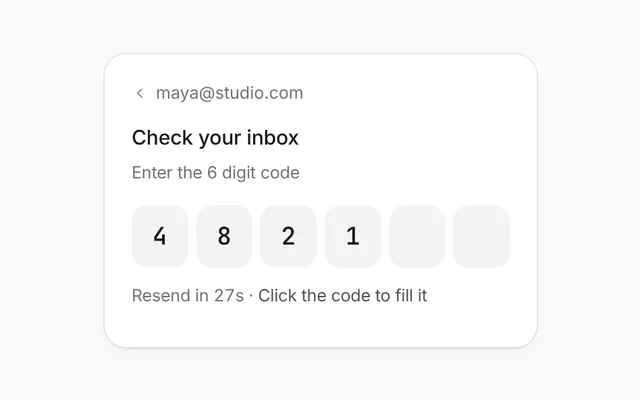
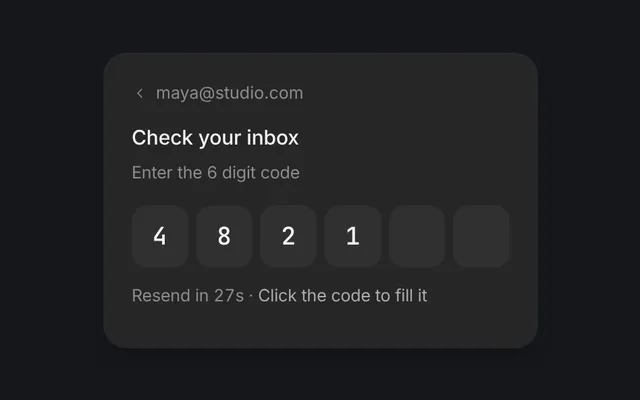
A one-time code, one box per digit, that fills from a paste. Free and MIT licensed, as HTML or a typed React component, in two styles with light and dark mode.
Enter the 6-digit code we sent to [email protected]
Resend code in 0:30
Install
Add it to your project with the CLI.
HTML, CSS and JavaScript
npx designme add otp-fieldReact
npx designme add otp-field --reactThe CLI copies the source into your project, so you own it and can change anything. The HTML version lands in ./designme with the shared core and a demo.html. The React version lands in src/components/designme and needs React 19; it works in Next.js, Vite and Astro.
About
What it is for and what it does.
OTP field takes a one-time code with one box per digit. Typing moves to the next box, Backspace moves back, and pasting the whole code fills every box at once. The code is checked as soon as the last box is filled: a wrong one shakes red and says how many tries are left, and the right one turns green.
- When people confirm an email address or a phone number with a code you send them.
- When a sign-in or a risky action needs a second step, like a code from an authenticator app.
- When people are likely to paste the code from an email, or have a phone offer it from a message.
- When a wrong code should be easy to fix without clearing the boxes by hand.
lengthboxes, six by default, in two halves with a short dash between them.value,defaultValueandonValueChangehold the digits;onCompletegets the code once every box is filled.- Pasting a code into any box fills them all from the first, ignoring spaces and dashes.
statusshows what's happening:checkingdims the digits and spins,errorshakes the boxes and turns them red,successturns them green and locks them. Typing after an error starts the code over from the first box.messagesets the line under the boxes, like "That code doesn't match. 2 tries left".footerholds a resend link or its countdown.title,descriptionandiconset the header, like "Check your email" with the address the code went to.
- The boxes form a group labelled "Verification code", and each box is named, like "Digit 3 of 6".
- The first box has
autocomplete="one-time-code", and every box hasinputmode="numeric", so phones show the number pad and can offer a code from a message. - Backspace clears a box, or the one before it when it's empty; ← and → move between boxes without changing them.
- A wrong code marks the boxes
aria-invalid, and the line under them is announced politely.
Usage
Import it and drive it from your own state.
Import
import { OtpField } from '@/components/designme/otp-field/OtpField';Example
The demo above as a React component, 48 lines you can copy.
'use client';
// The animated preview from designme.dev, rebuilt from the React component: an example of driving it from your own state.
import { useEffect, useRef, useState } from 'react';
import { OtpField, type OtpStatus } from './OtpField';
import { useStory, useWait } from '../lib/useScript';

/* ---------- OTP field: paste a code with two digits swapped, see it fail, and type the right one ---------- */
const CODE = '482157';

export default function OtpFieldDemo() {
  const ref = useRef<HTMLDivElement>(null);
  const wait = useWait();
  const [code, setCode] = useState('');
  const [status, setStatus] = useState<OtpStatus>('idle');
  const [tries, setTries] = useState(3);
  const [left, setLeft] = useState(30);

  // the resend link waits thirty seconds
  useEffect(() => {
    if (left <= 0 || status === 'success') return;
    const t = setTimeout(() => setLeft(l => l - 1), 1000);
    return () => clearTimeout(t);
  }, [left, status]);

  // the code is checked as soon as the last box is filled
  const check = async (c: string) => {
    setStatus('checking'); await wait(900);
    if (c === CODE) return setStatus('success');
    setTries(t => t - 1); setStatus('error');
  };

  // the preview's story: a paste with two digits swapped, then the right code typed a digit at a time
  useStory(ref, async ({ wait }) => {
    await wait(2000); setCode('482175');
    await wait(3500);
    for (let i = 1; i <= 6; i++) { setStatus('idle'); setCode(CODE.slice(0, i)); await wait(500); }
  });

  return (
    <div ref={ref} style={{ width: '100%' }}>
      <OtpField description="Enter the 6-digit code we sent to [email protected]" value={code}
        onValueChange={v => { setCode(v); if (status === 'error') setStatus('idle'); }} onComplete={c => void check(c)} status={status}
        message={status === 'error' ? `That code doesn't match. ${tries ? `${tries} ${tries === 1 ? 'try' : 'tries'} left` : 'Send a new code to try again'}` : status === 'success' ? 'Email verified' : undefined}
        footer={left > 0 ? <>Resend code in <span className="dm-num">0:{String(left).padStart(2, '0')}</span></> : <button type="button" onClick={() => setLeft(30)}>Resend code</button>} />
    </div>
  );
}
Props
Everything OtpField takes.
| Prop | Type | What it does |
|---|---|---|
title | string | Defaults to "Check your email" |
description | ReactNode | Like "Enter the 6-digit code we sent to [email protected]" |
icon | IconName | null | The tile above the title. Defaults to mail; null hides it |
length | number | How many digits. Defaults to 6, split in two halves |
value | string | The digits typed so far |
defaultValue | string | |
onValueChange | (value: string) => void | |
onComplete | (code: string) => void | Called with the code once every box is filled |
status | OtpStatus | `checking` dims the digits and spins, `error` shakes them red, `success` turns them green and locks them. Typing after an error starts the code over, so set it back to `idle` when the value changes |
message | string | The line under the boxes, like "That code doesn't match. 2 tries left". Defaults to a line for each status |
footer | ReactNode | Under the message, like a resend link |
className | string |
Code
The full source, as the CLI installs it.
OtpField.tsxReact · 108 lines
'use client';
import { useEffect, useRef, useState, type ClipboardEvent, type KeyboardEvent, type ReactNode } from 'react';
import { cx } from '../lib/cx';
import { useControllable } from '../lib/hooks';
import { Icon, type IconName } from '../lib/icons';
import { Spin } from '../lib/motion';
import '../designme.css';
import './otp-field.css';

export type OtpStatus = 'idle' | 'checking' | 'error' | 'success';

export interface OtpFieldProps {
  /** Defaults to "Check your email" */
  title?: string;
  /** Like "Enter the 6-digit code we sent to [email protected]" */
  description?: ReactNode;
  /** The tile above the title. Defaults to mail; null hides it */
  icon?: IconName | null;
  /** How many digits. Defaults to 6, split in two halves */
  length?: number;
  /** The digits typed so far */
  value?: string;
  defaultValue?: string;
  onValueChange?: (value: string) => void;
  /** Called with the code once every box is filled */
  onComplete?: (code: string) => void;
  /** `checking` dims the digits and spins, `error` shakes them red, `success` turns them green and locks them.
      Typing after an error starts the code over, so set it back to `idle` when the value changes */
  status?: OtpStatus;
  /** The line under the boxes, like "That code doesn't match. 2 tries left". Defaults to a line for each status */
  message?: string;
  /** Under the message, like a resend link */
  footer?: ReactNode;
  className?: string;
}

const LINE: Record<OtpStatus, string> = { idle: '', checking: 'Checking the code', error: "That code doesn't match", success: 'Verified' };

/** A one-time code with one box per digit. Typing moves along, Backspace clears and moves back, the arrow keys move,
    and a paste fills every box. The first box asks for autocomplete="one-time-code", so a phone can offer the code. */
export function OtpField({ title = 'Check your email', description, icon = 'mail', length = 6, value, defaultValue = '', onValueChange, onComplete, status = 'idle', message, footer, className }: OtpFieldProps) {
  const [code, setCode] = useControllable(value, defaultValue, onValueChange);
  const ins = useRef<(HTMLInputElement | null)[]>([]);
  const [popped, setPopped] = useState(-1);
  const locked = status === 'checking' || status === 'success';
  const digits = Array.from({ length }, (_, i) => code[i] ?? '');
  const half = Math.ceil(length / 2);

  // the code is handed over the moment the last box is filled
  const last = useRef('');
  useEffect(() => {
    if (code.length === length && code !== last.current && status === 'idle') onComplete?.(code);
    last.current = code;
  }, [code, length, status, onComplete]);
  useEffect(() => { if (popped < 0) return; const t = setTimeout(() => setPopped(-1), 160); return () => clearTimeout(t); }, [popped]);

  const focus = (i: number) => ins.current[Math.max(0, Math.min(length - 1, i))]?.focus();
  // a digit goes in at i; after a wrong code, typing starts the code over from the first box
  const put = (i: number, d: string) => {
    const start = status === 'error' ? '' : code;
    const at = status === 'error' ? 0 : Math.min(i, start.length);
    const next = (start.slice(0, at) + d + start.slice(at + 1)).slice(0, length);
    setCode(next); setPopped(at);
    if (at + 1 < length) focus(at + 1);
  };
  const fill = (text: string) => {
    const d = text.replace(/\D/g, '').slice(0, length); if (!d) return;
    setCode(d); focus(d.length < length ? d.length : length - 1);
  };
  const onKey = (i: number) => (e: KeyboardEvent<HTMLInputElement>) => {
    if (locked) return;
    if (/^\d$/.test(e.key)) { e.preventDefault(); put(i, e.key); }
    else if (e.key === 'Backspace') {
      e.preventDefault();
      if (status === 'error') { setCode(''); focus(0); }
      else if (digits[i]) setCode(code.slice(0, i) + code.slice(i + 1));
      else if (i > 0) { setCode(code.slice(0, i - 1) + code.slice(i)); focus(i - 1); }
    }
    else if (e.key === 'ArrowLeft') { e.preventDefault(); focus(i - 1); }
    else if (e.key === 'ArrowRight') { e.preventDefault(); focus(i + 1); }
  };
  const line = message ?? LINE[status];

  return (
    <div data-dm="" className={cx('dm-otp dm-panel', className)}>
      {icon && <span className="dm-otp-ic"><Icon name={icon} /></span>}
      <b className="dm-otp-t">{title}</b>
      {description && <p className="dm-muted dm-otp-s">{description}</p>}
      <div className={cx('dm-otp-in', status === 'checking' && 'dm-vf', status === 'error' && 'dm-bad', status === 'success' && 'dm-ok')} role="group" aria-label="Verification code">
        {digits.map((d, i) => (
          <span key={i} style={{ display: 'contents' }}>
            {i === half && <span className="dm-sep" aria-hidden="true" />}
            <input ref={el => { ins.current[i] = el; }} className={cx('dm-otp-d', popped === i && 'dm-bump')} value={d} readOnly={locked}
              inputMode="numeric" pattern="[0-9]*" maxLength={1} autoComplete={i ? 'off' : 'one-time-code'} aria-label={`Digit ${i + 1} of ${length}`}
              aria-invalid={status === 'error' || undefined} onKeyDown={onKey(i)} onFocus={e => e.target.select()}
              onChange={e => { const v = e.target.value.replace(/\D/g, ''); if (v.length > 1) fill(v); else if (v) put(i, v); }}
              onPaste={(e: ClipboardEvent<HTMLInputElement>) => { e.preventDefault(); if (!locked) fill(e.clipboardData.getData('text')); }} />
          </span>
        ))}
      </div>
      <p className={cx('dm-otp-m', status === 'error' && 'dm-bad', status === 'success' && 'dm-ok')} aria-live="polite">
        {status === 'checking' ? <Spin /> : status === 'error' ? <Icon name="alert" size="xs" /> : status === 'success' ? <Icon name="ok" size="xs" /> : null}{line}
      </p>
      {footer && status !== 'success' && <p className="dm-muted dm-otp-f">{footer}</p>}
    </div>
  );
}
otp-field.cssReact · 28 lines
/* Generated from designme.dev by scripts/sync.mjs. Edit the site, then sync. */
/* ---------- OTP field ---------- */
/* a one-time code, one box per digit: typing moves along, Backspace moves back, and a paste fills every box. A wrong
   code shakes and turns red; typing again starts it over */
.dm-otp{position:relative;width:100%;max-width:360px;margin:0 auto;padding:22px var(--dm-s-5) 18px;display:flex;flex-direction:column;align-items:center;gap:6px;text-align:center}
.dm-otp-ic{width:40px;height:40px;border-radius:var(--dm-r-in);background:var(--dm-chip);color:var(--dm-fg2);display:grid;place-items:center;margin-bottom:6px}
.dm-otp-t{font-weight:500;font-size:14px}
.dm-otp-s{margin:0 0 10px;font-size:13px;line-height:1.45;max-width:260px}
.dm-otp-in{display:flex;align-items:center;justify-content:center;gap:6px;width:100%;max-width:286px}
.dm-otp-in .dm-sep{flex:none;width:8px;height:1.5px;border-radius:1px;background:var(--dm-rail);margin:0 2px}
.dm-otp-d{flex:1 1 0;min-width:0;max-width:40px;height:var(--dm-field-h);padding:0;border:0;outline:0;border-radius:var(--dm-r-field);background:var(--dm-surface);box-shadow:inset 0 0 0 1px color-mix(in srgb,var(--dm-field-line) 50%,transparent);text-align:center;font:inherit;font-size:14px;font-weight:500;font-variant-numeric:tabular-nums;color:var(--dm-fg);caret-color:var(--dm-accent-mark,var(--dm-accent));transition:box-shadow .25s,background .25s,color .25s,transform .25s var(--dm-ease)}
@supports (corner-shape:squircle){.dm-otp-d{corner-shape:squircle;border-radius:var(--dm-r-field-sq)}}
.dm-otp-d:focus{box-shadow:inset 0 0 0 1px color-mix(in srgb,var(--dm-field-line-strong) 50%,transparent)}
/* (not .pop, which is the shared popover class and would hide the box) */
.dm-otp-d.dm-bump{transform:scale(1.06)}
.dm-otp-in.dm-vf .dm-otp-d{color:var(--dm-fg2)}
/* a wrong code keeps its red edge, focused or not, until typing starts it over */
.dm-otp-in.dm-bad .dm-otp-d{background:var(--dm-bad-bg);color:var(--dm-bad);box-shadow:inset 0 0 0 1px color-mix(in srgb,var(--dm-bad) 55%,transparent)}
.dm-otp-in.dm-bad{animation:dm-otpsh .42s}
@keyframes dm-otpsh{20%{transform:translateX(-6px)}40%{transform:translateX(5px)}60%{transform:translateX(-3px)}80%{transform:translateX(2px)}}
.dm-otp-in.dm-ok .dm-otp-d{background:var(--dm-ok-bg);color:var(--dm-ok);box-shadow:inset 0 0 0 1px color-mix(in srgb,var(--dm-ok) 35%,transparent)}
.dm-otp-m{margin:var(--dm-s-2) 0 0;min-height:20px;display:inline-flex;align-items:center;justify-content:center;gap:6px;font-size:12.5px;color:var(--dm-fg2)}
.dm-otp-m .dm-spin{width:11px;height:11px}
.dm-otp-m.dm-bad{color:var(--dm-bad)}
.dm-otp-m.dm-ok{color:var(--dm-ok)}
.dm-otp-f{margin:2px 0 0;font-size:12.5px}
.dm-otp-f button{color:var(--dm-accent-fg,var(--dm-accent));font-weight:500;font-size:12.5px}
otp-field.htmlHTML · 13 lines
<div class="card" data-c="otp-field">
  <div class="stage-in">
    <div class="otp panel">
      <span class="otp-ic"><svg class="i s"><use href="#i-mail"/></svg></span>
      <b class="otp-t">Check your email</b>
      <p class="muted otp-s">Enter the 6-digit code we sent to [email protected]</p>
      <div class="otp-in" role="group" aria-label="Verification code"></div>
      <p class="otp-m" aria-live="polite"></p>
      <p class="muted otp-f"><span class="otp-rs">Resend code in <span class="num">0:30</span></span></p>
    </div>
  </div>
</div>
otp-field.cssHTML · 27 lines
/* ---------- OTP field ---------- */
/* a one-time code, one box per digit: typing moves along, Backspace moves back, and a paste fills every box. A wrong
   code shakes and turns red; typing again starts it over */
.otp{position:relative;width:100%;max-width:360px;margin:0 auto;padding:22px var(--s-5) 18px;display:flex;flex-direction:column;align-items:center;gap:6px;text-align:center}
.otp-ic{width:40px;height:40px;border-radius:var(--r-in);background:var(--chip);color:var(--fg2);display:grid;place-items:center;margin-bottom:6px}
.otp-t{font-weight:500;font-size:14px}
.otp-s{margin:0 0 10px;font-size:13px;line-height:1.45;max-width:260px}
.otp-in{display:flex;align-items:center;justify-content:center;gap:6px;width:100%;max-width:286px}
.otp-in .sep{flex:none;width:8px;height:1.5px;border-radius:1px;background:var(--rail);margin:0 2px}
.otp-d{flex:1 1 0;min-width:0;max-width:40px;height:var(--field-h);padding:0;border:0;outline:0;border-radius:var(--r-field);background:var(--surface);box-shadow:inset 0 0 0 1px color-mix(in srgb,var(--field-line) 50%,transparent);text-align:center;font:inherit;font-size:14px;font-weight:500;font-variant-numeric:tabular-nums;color:var(--fg);caret-color:var(--accent-mark,var(--accent));transition:box-shadow .25s,background .25s,color .25s,transform .25s var(--ease)}
@supports (corner-shape:squircle){.otp-d{corner-shape:squircle;border-radius:var(--r-field-sq)}}
.otp-d:focus{box-shadow:inset 0 0 0 1px color-mix(in srgb,var(--field-line-strong) 50%,transparent)}
/* (not .pop, which is the shared popover class and would hide the box) */
.otp-d.bump{transform:scale(1.06)}
.otp-in.vf .otp-d{color:var(--fg2)}
/* a wrong code keeps its red edge, focused or not, until typing starts it over */
.otp-in.bad .otp-d{background:var(--bad-bg);color:var(--bad);box-shadow:inset 0 0 0 1px color-mix(in srgb,var(--bad) 55%,transparent)}
.otp-in.bad{animation:otpsh .42s}
@keyframes otpsh{20%{transform:translateX(-6px)}40%{transform:translateX(5px)}60%{transform:translateX(-3px)}80%{transform:translateX(2px)}}
.otp-in.ok .otp-d{background:var(--ok-bg);color:var(--ok);box-shadow:inset 0 0 0 1px color-mix(in srgb,var(--ok) 35%,transparent)}
.otp-m{margin:var(--s-2) 0 0;min-height:20px;display:inline-flex;align-items:center;justify-content:center;gap:6px;font-size:12.5px;color:var(--fg2)}
.otp-m .spin{width:11px;height:11px}
.otp-m.bad{color:var(--bad)}
.otp-m.ok{color:var(--ok)}
.otp-f{margin:2px 0 0;font-size:12.5px}
.otp-f button{color:var(--accent-fg,var(--accent));font-weight:500;font-size:12.5px}
otp-field.jsHTML · 61 lines
DM.def('otp-field', (r, c) => {
  r.innerHTML = r.innerHTML.replace('{mail}', I('mail'));
  const CODE = '482157';
  const box = $('.otp-in', r), msg = $('.otp-m', r), rs = $('.otp-rs', r);
  // one box per digit, with a short dash between the two halves. The first box carries autocomplete="one-time-code",
  // so a phone can offer the code from a message
  box.innerHTML = Array.from({ length:6 }, (_, i) => `${i === 3 ? '<span class="sep" aria-hidden="true"></span>' : ''}<input class="otp-d" inputmode="numeric" pattern="[0-9]*" maxlength="1" autocomplete="${i ? 'off' : 'one-time-code'}" aria-label="Digit ${i + 1} of 6">`).join('');
  const ins = $$('.otp-d', box);
  let state = 'idle', tries = 3;
  const say = (h, cls) => { msg.className = 'otp-m' + (cls ? ' ' + cls : ''); msg.innerHTML = h; if (h) enter(msg); };
  const code = () => ins.map(i => i.value).join('');
  const pop = el => { el.classList.add('bump'); c.later(160, () => el.classList.remove('bump')); };
  // a wrong code stays red until you type again, which starts it over
  function fresh(){ if (state !== 'bad') return; state = 'idle'; box.classList.remove('bad'); ins.forEach(i => { i.value = ''; i.removeAttribute('aria-invalid'); }); say(''); }
  function put(i, d){ fresh(); ins[i].value = d; pop(ins[i]); if (code().length === 6) verify(); }
  // the code is checked as soon as the last box is filled
  function verify(){
    if (state !== 'idle') return; state = 'vf';
    c.run(async () => {
      box.classList.add('vf'); ins.forEach(i => { i.readOnly = true; i.blur(); }); say('<span class="spin"></span>Checking the code');
      await c.wait(900); box.classList.remove('vf'); ins.forEach(i => i.readOnly = false);
      if (code() === CODE){
        state = 'ok'; box.classList.add('ok'); ins.forEach(i => i.readOnly = true);
        say(`${I('ok','xs')}Email verified`, 'ok'); rs.parentElement.hidden = true; return;
      }
      state = 'bad'; tries--; box.classList.remove('bad'); void box.offsetWidth; box.classList.add('bad'); ins.forEach(i => i.setAttribute('aria-invalid', 'true'));
      say(`${I('alert','xs')}That code doesn't match. ${tries ? `${tries} ${tries === 1 ? 'try' : 'tries'} left` : 'Send a new code to try again'}`, 'bad');
    });
  }
  // typing a digit fills the box and moves on; Backspace clears it, or the one before; the arrows move; a paste fills
  // every box from the first
  ins.forEach((inp, i) => {
    inp.oninput = () => { const d = inp.value.replace(/\D/g, ''); inp.value = ''; if (!d) return; if (d.length > 1) return fill(d); put(i, d); if (ins[i + 1] && state === 'idle') ins[i + 1].focus(); };
    inp.onkeydown = e => {
      if (e.key === 'Backspace'){ e.preventDefault(); if (state === 'bad'){ fresh(); ins[0].focus(); } else if (inp.value){ inp.value = ''; } else if (ins[i - 1]){ ins[i - 1].value = ''; ins[i - 1].focus(); } }
      else if (e.key === 'ArrowLeft' && ins[i - 1]){ e.preventDefault(); ins[i - 1].focus(); }
      else if (e.key === 'ArrowRight' && ins[i + 1]){ e.preventDefault(); ins[i + 1].focus(); }
      else if (/^\d$/.test(e.key) && inp.value){ e.preventDefault(); const j = state === 'bad' ? 0 : i; put(j, e.key); if (ins[j + 1] && state === 'idle') ins[j + 1].focus(); }
    };
    inp.onpaste = e => { e.preventDefault(); fill((e.clipboardData || window.clipboardData).getData('text')); };
    inp.onfocus = () => inp.select();
  });
  function fill(text, focus = true){
    const d = text.replace(/\D/g, '').slice(0, 6); if (!d) return;
    fresh(); ins.forEach((inp, i) => { inp.value = d[i] || ''; if (d[i]) c.later(i * 40, () => pop(inp)); });
    if (d.length === 6) verify(); else if (focus) ins[d.length].focus();
  }
  // the resend link waits thirty seconds
  let left = 30; const ns = $('.num', rs);
  const iv = c.every(1000, () => { if (state === 'ok') return clearInterval(iv); left--; ns.textContent = '0:' + String(left).padStart(2, '0'); if (left <= 0){ clearInterval(iv); rs.innerHTML = '<button>Resend code</button>'; $('button', rs).onclick = () => { rs.textContent = 'A new code is on its way'; }; } });
  // the preview's story: paste a code with two digits swapped, see it fail, and type the right one
  c.story(async s => {
    await s.beat(3);
    await s.tap(ins[0]); s.away();
    await s.beat(1); fill('482175', false);
    await s.until(() => state === 'bad'); await s.beat(4);
    for (let i = 0; i < 6; i++){ put(i, CODE[i]); await s.beat(1); }
    await s.until(() => state === 'ok'); await s.beat(2);
  });
});
Questions
What people ask about it.
- Does it check the code?
- No.
onCompletegives you the code. Setstatustochecking, thensuccessorerrorfrom what your server says. - Why one box per digit?
- People can see how many digits are left and where a typo is. A paste still fills them all at once, so it's no slower.
- Can the code have letters?
- Not yet. Each box takes a digit, which is what most email and text codes use.
- What happens after a wrong code?
- The digits stay red so people can see what they entered. Typing again, or Backspace, clears them and starts from the first box.
More in Forms and inputs
Buttons, fields, pickers and sign-in flows for any product.