ConversationThread panel
Built by DesignMe, free to use under the MIT licence.
Expert design and dev support for startups and enterprises.
Book a callThread panel
Switch between agent threads and reply in place. Free and MIT licensed, as HTML or a typed React component, in two styles with light and dark mode.
Install
Add it to your project with the CLI.
HTML, CSS and JavaScript
npx designme add thread-panelReact
npx designme add thread-panel --reactThe CLI copies the source into your project, so you own it and can change anything. The HTML version lands in ./designme with the shared core and a demo.html. The React version lands in src/components/designme and needs React 19; it works in Next.js, Vite and Astro.
About
What it is for and what it does.
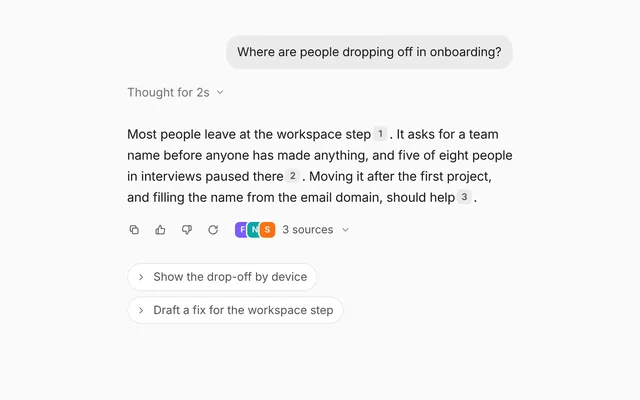
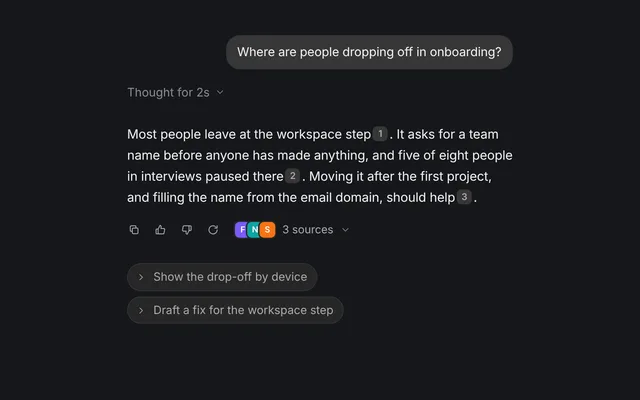
Thread panel keeps several conversations with an agent in one place, one tab per thread, with a reply field under the open thread. People switch between threads with the tabs and answer the agent without leaving the panel.
- When one person runs several tasks with the same agent and needs to jump between them.
- When a side panel next to the main work should hold the agent conversations.
- When each thread has a status you want to show at a glance, like done, waiting or idle.
- When agent replies should show the files or pages they drew on.
- Each thread gets a tab with a coloured dot set by
color, and an underline slides to the open tab. - The open thread can be controlled with
valueandonValueChange, or left to the tabs withdefaultValue. - The reply field submits on Enter and calls
onSendwith the text and the open thread's id. The Send button stays disabled while the field is empty. - A message with
thinkingshows a shimmering "Thinking" line while the agent works, and agent messages can carrysourcesas chips with tooltips. - Switching threads staggers the messages in, and a new message scrolls smoothly into view.
- The draft can be controlled with
draftandonDraftChange, andbare={false}gives the panel its own card.
- The tabs use
role="tablist"androle="tab"witharia-selectedon the open thread. - The message area is an
aria-live="polite"region, so new replies are announced. - The reply field is labelled "Reply" and the icon button is labelled "Send".
Usage
Import it and drive it from your own state.
Import
import { ThreadPanel } from '@/components/designme/thread-panel/ThreadPanel';Example
The demo above as a React component, 53 lines you can copy.
'use client';
// The animated preview from designme.dev, rebuilt from the React component: an example of driving it from your own state.
import { useEffect, useRef, useState } from 'react';
import { ThreadPanel, type Thread } from './ThreadPanel';
import { useStory } from '../lib/useScript';

/* ---------- Thread panel: three threads; a reply is typed and sent by itself, gets a short Thinking, then an answer ---------- */
const THREADS: Thread[] = [
  { id: 'onboarding', title: 'Onboarding', color: 'var(--dm-ok)', messages: [
    { from: 'user', text: 'Why is the workspace step losing people?' },
    { from: 'agent', text: 'It asks for a team name before anyone has made anything. Moving it after the first project, with the name filled from the email domain, should help.',
      sources: [{ label: 'Funnel data', tip: 'Amplitude, last 30 days' }, { label: 'Session notes', tip: 'Notion, 8 interviews' }] }] },
  { id: 'tokens', title: 'Tokens', color: 'var(--dm-warn)', messages: [
    { from: 'user', text: 'Which colours are still hard-coded?' },
    { from: 'agent', text: 'Eleven, mostly greys in Button and Card. I can swap them for tokens in one pass.', sources: [{ label: 'tokens.ts', tip: 'src/styles/tokens.ts' }] }] },
  { id: 'launch', title: 'Launch email', color: 'var(--dm-faint)', messages: [
    { from: 'user', text: 'Draft the launch email for Friday.' },
    { from: 'agent', text: 'Two subject lines are ready. The shorter one tested better with the team.' }] }
];

export default function ThreadPanelDemo() {
  const [threads, setThreads] = useState(THREADS);
  const timers = useRef<ReturnType<typeof setTimeout>[]>([]);
  useEffect(() => () => timers.current.forEach(clearTimeout), []);
  const add = (id: string, change: (t: Thread) => Thread) => setThreads(ts => ts.map(t => (t.id === id ? change(t) : t)));

  const send = (text: string, id: string) => {
    add(id, t => ({ ...t, messages: [...t.messages, { from: 'user', text }, { from: 'agent', text: '', thinking: true }] }));
    timers.current.push(setTimeout(() => add(id, t => ({
      ...t, messages: [...t.messages.filter(m => !m.thinking), { from: 'agent', text: "On it. I'll update this thread when it's done." }]
    })), 1400));
  };

  // once the card has settled, a reply is typed and sent in place. Clicking, focusing or typing in it takes over, and what
  // it had typed goes
  const [draft, setDraft] = useState('');
  const ref = useRef<HTMLDivElement>(null);
  useStory(ref, async ({ wait, taken }) => {
    await wait(1800);
    taken(() => setDraft(''));
    const reply = 'Can you make that change now?';
    for (let i = 1; i <= reply.length; i++) { setDraft(reply.slice(0, i)); await wait(32 + Math.random() * 40); }
    await wait(380);
    setDraft(''); send(reply, 'onboarding');
  });

  return (
    <div ref={ref} style={{ width: '100%' }}>
      <ThreadPanel threads={threads} onSend={send} draft={draft} onDraftChange={setDraft} />
    </div>
  );
}
Props
Everything ThreadPanel takes.
| Prop | Type | What it does |
|---|---|---|
threadsrequired | Thread[] | |
value | string | The id of the open thread. Leave it out to let the tabs switch it |
defaultValue | string | |
onValueChange | (id: string) => void | |
onSend | (text: string, threadId: string) => void | Called with the reply and the open thread's id. Add the message to that thread to show it |
draft | string | The reply being written. Leave it out to let the field keep its own |
defaultDraft | string | |
onDraftChange | (text: string) => void | |
placeholder | string | |
bare | boolean | Sits flat in a chat column (the default, as on designme.dev). Set false to give it a card of its own |
className | string |
Code
The full source, as the CLI installs it.
ThreadPanel.tsxReact · 124 lines
'use client';
import { useRef, useState, type CSSProperties, type FormEvent, type ReactNode } from 'react';
import { cx } from '../lib/cx';
import { useControllable, useIsoLayoutEffect } from '../lib/hooks';
import { Icon } from '../lib/icons';
import { enter, SourceChip, Tip, type Source } from '../lib/motion';
import '../designme.css';
import './thread-panel.css';

export interface ThreadMessage {
  /** Keeps the message in place when the list changes. Defaults to its position */
  id?: string;
  from: 'user' | 'agent';
  text: ReactNode;
  /** Files or pages the agent used, shown as chips above its reply */
  sources?: Source[];
  /** Shows a shimmering "Thinking" (or `text`, if given) while the agent works on a reply */
  thinking?: boolean;
}

export interface Thread {
  id: string;
  title: string;
  /** The dot in front of the title, any CSS colour, like 'var(--dm-ok)'. Defaults to a quiet grey */
  color?: string;
  messages: ThreadMessage[];
}

export interface ThreadPanelProps {
  threads: Thread[];
  /** The id of the open thread. Leave it out to let the tabs switch it */
  value?: string;
  defaultValue?: string;
  onValueChange?: (id: string) => void;
  /** Called with the reply and the open thread's id. Add the message to that thread to show it */
  onSend?: (text: string, threadId: string) => void;
  /** The reply being written. Leave it out to let the field keep its own */
  draft?: string;
  defaultDraft?: string;
  onDraftChange?: (text: string) => void;
  placeholder?: string;
  /** Sits flat in a chat column (the default, as on designme.dev). Set false to give it a card of its own */
  bare?: boolean;
  className?: string;
}

function Message({ m, delay }: { m: ThreadMessage; delay: number }) {
  const e = enter(delay);
  if (m.from === 'user') return <div className={cx('dm-bub', e.className)} style={e.style}>{m.text}</div>;
  if (m.thinking) return <div className={cx('dm-thp-ag', e.className)} style={e.style}><span className="dm-shim">{m.text || 'Thinking'}</span></div>;
  return (
    <div className={cx('dm-thp-ag', e.className)} style={e.style}>
      {!!m.sources?.length && (
        <div className="dm-src">
          {m.sources.map((s, i) => s.kind ? <SourceChip key={i} source={s} /> : (
            <Tip key={i} label={s.tip ?? s.label}>
              <button type="button" className="dm-fchip dm-lnk" onClick={s.onClick}><Icon name="file-text" size="xs" />{s.label}</button>
            </Tip>
          ))}
        </div>
      )}
      {m.text}
    </div>
  );
}

/** One thread's messages. It mounts again for each thread, so a switch staggers every message in, and later ones come in on their own */
function Body({ messages }: { messages: ThreadMessage[] }) {
  const ref = useRef<HTMLDivElement>(null);
  const [first] = useState(messages.length);
  // the first messages are simply there; a later one glides into view
  useIsoLayoutEffect(() => { const el = ref.current; if (!el) return; if (messages.length > first) el.scrollTo({ top: el.scrollHeight, behavior: 'smooth' }); else el.scrollTop = el.scrollHeight; }, [messages.length]);
  return (
    <div ref={ref} className="dm-thp-body" aria-live="polite">
      {messages.map((m, i) => <Message key={(m.id ?? i) + (m.thinking ? '-t' : '')} m={m} delay={i < first ? i * 70 : 0} />)}
    </div>
  );
}

/** Several conversations with an agent, one tab each, with a reply field under the open one. */
export function ThreadPanel({ threads, value, defaultValue, onValueChange, onSend, draft: draftProp, defaultDraft = '', onDraftChange, placeholder = 'Reply to the agent', bare = true, className }: ThreadPanelProps) {
  const [cur, setCur] = useControllable(value, defaultValue ?? threads[0]?.id ?? '', onValueChange);
  const thread = threads.find(t => t.id === cur) ?? threads[0];
  const [draft, setDraft] = useControllable(draftProp, defaultDraft, onDraftChange);

  // the underline slides to the open tab, 10px in from each side
  const tabs = useRef<HTMLDivElement>(null);
  const [ink, setInk] = useState<CSSProperties>({});
  useIsoLayoutEffect(() => {
    const el = tabs.current; if (!el) return;
    const place = () => { const b = el.querySelector<HTMLElement>('[aria-selected="true"]'); if (b) setInk({ left: b.offsetLeft + 10, width: b.offsetWidth - 20 }); };
    place();
    document.fonts?.ready.then(place);
    const ro = new ResizeObserver(place); ro.observe(el);
    return () => ro.disconnect();
  }, [thread?.id, threads.length]);

  const send = (e: FormEvent) => {
    e.preventDefault();
    const v = draft.trim(); if (!v || !thread) return;
    setDraft(''); onSend?.(v, thread.id);
  };

  return (
    <div data-dm="" className={cx('dm-thp', !bare && 'dm-panel', className)}>
      <div ref={tabs} className="dm-thp-tabs" role="tablist">
        {threads.map(t => (
          <button type="button" key={t.id} className="dm-thp-tab" role="tab" aria-selected={t.id === thread?.id} onClick={() => setCur(t.id)}>
            <span className="dm-dot" style={{ color: t.color ?? 'var(--dm-faint)' }} />{t.title}
          </button>
        ))}
        <span className="dm-thp-ink" style={ink} />
      </div>
      {thread && <Body key={thread.id} messages={thread.messages} />}
      <form className="dm-thp-in" onSubmit={send}>
        <input className="dm-thp-field" aria-label="Reply" placeholder={placeholder} value={draft} onChange={e => setDraft(e.target.value)} />
        <Tip label="Send" kbd="↵">
          <button type="submit" className="dm-thp-send" aria-label="Send" disabled={!draft.trim()}><Icon name="up" /></button>
        </Tip>
      </form>
    </div>
  );
}
thread-panel.cssReact · 24 lines
/* Generated from designme.dev by scripts/sync.mjs. Edit the site, then sync. */
/* ---------- Thread panel ---------- */
.dm-thp{display:flex;flex-direction:column;height:360px;overflow:hidden}
.dm-thp-tabs{display:flex;gap:var(--dm-s-1);padding:var(--dm-s-2) var(--dm-s-2) 0;border-bottom:1px solid color-mix(in srgb,var(--dm-line) 50%,transparent);position:relative;overflow-x:auto;scrollbar-width:none}
.dm-thp-tab{display:flex;align-items:center;gap:7px;white-space:nowrap;flex:none;padding:7px 10px 10px;font-size:13px;color:var(--dm-muted);position:relative;transition:color .25s}
@media (hover:hover) and (pointer:fine){.dm-thp-tab:hover{color:var(--dm-fg2)}}
/* the tabs scroll sideways, which would cut an outside ring: theirs is drawn inside */
.dm-thp-tab:focus-visible{outline-offset:-2px}
.dm-thp-tab[aria-selected="true"]{color:var(--dm-fg)}
.dm-thp-tab .dm-dot{width:6px;height:6px}
.dm-thp-ink{position:absolute;bottom:-1px;height:2px;border-radius:2px;background:var(--dm-fg);transition:left .5s var(--dm-ease),width .5s var(--dm-ease)}
.dm-thp-body{flex:1;overflow-y:auto;padding:14px;display:flex;flex-direction:column;gap:var(--dm-s-3);scrollbar-width:thin}
.dm-thp-body .dm-bub{font-size:13.5px}
.dm-thp-ag{font-size:13.5px;line-height:1.6;color:var(--dm-fg)}
.dm-thp-ag .dm-src{display:flex;gap:6px;margin-bottom:6px;flex-wrap:wrap}
.dm-thp-in{display:flex;align-items:center;gap:var(--dm-s-2);margin:0 10px 10px;padding:var(--dm-s-1) var(--dm-s-1) var(--dm-s-1) var(--dm-s-3);border-radius:var(--dm-r-field);background:var(--dm-surface);box-shadow:inset 0 0 0 1px color-mix(in srgb,var(--dm-field-line) 50%,transparent);transition:box-shadow var(--dm-t-fast)}
@supports (corner-shape:squircle){.dm-thp-in{corner-shape:squircle;border-radius:var(--dm-r-field-sq)}}
.dm-thp-in:has(.dm-thp-field:focus){box-shadow:inset 0 0 0 1px color-mix(in srgb,var(--dm-field-line-strong) 50%,transparent)}
.dm-thp-field{flex:1;min-width:0;border:0;outline:0;background:none;font-size:13.5px;height:32px}
.dm-thp-field::placeholder{color:var(--dm-muted)}
.dm-thp-send{width:28px;height:28px;border-radius:50%;display:grid;place-items:center;background:var(--dm-accent);color:var(--dm-on-accent);transition:opacity .25s,transform .15s}
.dm-thp-send[disabled]{opacity:1;cursor:not-allowed;background:var(--dm-dis-hatch),var(--dm-dis-fill);color:var(--dm-dis);box-shadow:var(--dm-soft-ring)}
.dm-thp-send:active{transform:scale(.92)}
thread-panel.htmlHTML · 10 lines
<div class="card bare" data-c="thread-panel">
  <div class="stage-in">
    <div class="thp panel">
      <div class="thp-tabs" role="tablist"></div>
      <div class="thp-body" aria-live="polite"></div>
      <form class="thp-in"><input class="thp-field" aria-label="Reply" placeholder="Reply to the agent"><button class="thp-send" aria-label="Send" data-tip="Send" data-tip-k="↵" disabled><svg class="i s"><use href="#i-up"/></svg></button></form>
    </div>
  </div>
</div>
thread-panel.cssHTML · 23 lines
/* ---------- Thread panel ---------- */
.thp{display:flex;flex-direction:column;height:360px;overflow:hidden}
.thp-tabs{display:flex;gap:var(--s-1);padding:var(--s-2) var(--s-2) 0;border-bottom:1px solid color-mix(in srgb,var(--line) 50%,transparent);position:relative;overflow-x:auto;scrollbar-width:none}
.thp-tab{display:flex;align-items:center;gap:7px;white-space:nowrap;flex:none;padding:7px 10px 10px;font-size:13px;color:var(--muted);position:relative;transition:color .25s}
@media (hover:hover) and (pointer:fine){.thp-tab:hover{color:var(--fg2)}}
/* the tabs scroll sideways, which would cut an outside ring: theirs is drawn inside */
.thp-tab:focus-visible{outline-offset:-2px}
.thp-tab[aria-selected="true"]{color:var(--fg)}
.thp-tab .dot{width:6px;height:6px}
.thp-ink{position:absolute;bottom:-1px;height:2px;border-radius:2px;background:var(--fg);transition:left .5s var(--ease),width .5s var(--ease)}
.thp-body{flex:1;overflow-y:auto;padding:14px;display:flex;flex-direction:column;gap:var(--s-3);scrollbar-width:thin}
.thp-body .bub{font-size:13.5px}
.thp-ag{font-size:13.5px;line-height:1.6;color:var(--fg)}
.thp-ag .src{display:flex;gap:6px;margin-bottom:6px;flex-wrap:wrap}
.thp-in{display:flex;align-items:center;gap:var(--s-2);margin:0 10px 10px;padding:var(--s-1) var(--s-1) var(--s-1) var(--s-3);border-radius:var(--r-field);background:var(--surface);box-shadow:inset 0 0 0 1px color-mix(in srgb,var(--field-line) 50%,transparent);transition:box-shadow var(--t-fast)}
@supports (corner-shape:squircle){.thp-in{corner-shape:squircle;border-radius:var(--r-field-sq)}}
.thp-in:has(.thp-field:focus){box-shadow:inset 0 0 0 1px color-mix(in srgb,var(--field-line-strong) 50%,transparent)}
.thp-field{flex:1;min-width:0;border:0;outline:0;background:none;font-size:13.5px;height:32px}
.thp-field::placeholder{color:var(--muted)}
.thp-send{width:28px;height:28px;border-radius:50%;display:grid;place-items:center;background:var(--accent);color:var(--on-accent);transition:opacity .25s,transform .15s}
.thp-send[disabled]{opacity:1;cursor:not-allowed;background:var(--dis-hatch),var(--dis-fill);color:var(--dis);box-shadow:var(--soft-ring)}
.thp-send:active{transform:scale(.92)}
thread-panel.jsHTML · 31 lines
DM.def('thread-panel', (r, c) => {
  r.innerHTML = r.innerHTML.replace('{up}', I('up'));
  const T = [
    { t:'Onboarding', col:'var(--ok)', msgs:[['u','Why is the workspace step losing people?'],['a','It asks for a team name before anyone has made anything. Moving it after the first project, with the name filled from the email domain, should help.', ['Funnel data','Session notes']]] },
    { t:'Tokens', col:'var(--warn)', msgs:[['u','Which colours are still hard-coded?'],['a','Eleven, mostly greys in Button and Card. I can swap them for tokens in one pass.', ['tokens.ts']]] },
    { t:'Launch email', col:'var(--faint)', msgs:[['u','Draft the launch email for Friday.'],['a','Two subject lines are ready. The shorter one tested better with the team.', []]] }
  ];
  let cur = 0;
  const tabs = $('.thp-tabs', r), body = $('.thp-body', r), field = $('.thp-field', r), send = $('.thp-send', r);
  tabs.innerHTML = T.map((t, i) => `<button class="thp-tab" role="tab" aria-selected="${i === 0}"><span class="dot" style="color:${t.col}"></span>${t.t}</button>`).join('') + '<span class="thp-ink"></span>';
  const ink = $('.thp-ink', r), tbs = $$('.thp-tab', r);
  const place = () => { const b = tbs[cur]; ink.style.left = b.offsetLeft + 10 + 'px'; ink.style.width = b.offsetWidth - 20 + 'px'; };
  const msg = (m, anim) => { const el = m[0] === 'u' ? html(`<div class="bub">${m[1]}</div>`) : html(`<div class="thp-ag">${m[2] && m[2].length ? `<div class="src">${m[2].map(s => `<button class="fchip lnk" data-tip="${({ 'Funnel data':'Amplitude, last 30 days', 'Session notes':'Notion, 8 interviews', 'tokens.ts':'src/styles/tokens.ts' })[s] || s}">${I('file-text','xs')}${s}</button>`).join('')}</div>` : ''}${m[1]}</div>`); body.appendChild(el); if (anim){ enter(el); body.scrollTo({ top:body.scrollHeight, behavior:REDUCE ? 'auto' : 'smooth' }); } else body.scrollTop = body.scrollHeight; return el; };
  function show(i){ cur = i; tbs.forEach((b, k) => b.setAttribute('aria-selected', k === i)); place(); body.innerHTML = ''; T[i].msgs.forEach((m, k) => { const el = msg(m); enter(el, k * 70); }); }
  tbs.forEach((b, i) => b.onclick = () => show(i));
  field.oninput = () => { send.disabled = !field.value.trim(); };
  $('.thp-in', r).onsubmit = e => { e.preventDefault(); const v = field.value.trim(); if (!v) return; field.value = ''; send.disabled = true;
    const m = ['u', v]; T[cur].msgs.push(m); msg(m, true);
    const th = html('<div class="thp-ag"><span class="shim">Thinking</span></div>'); body.appendChild(th); enter(th);
    const k = cur; c.later(1400, () => { th.remove(); const a = ['a', 'On it. I\'ll update this thread when it\'s done.', []]; T[k].msgs.push(a); if (cur === k) msg(a, true); });
  };
  requestAnimationFrame(() => show(0)); new ResizeObserver(place).observe(tabs);
  // once the card has settled, a reply is typed and sent in place, unless someone has started using it
  // the preview asks a follow-up by itself; clicking, focusing or typing in it takes over, and what it had typed goes
  c.run(async () => {
    await c.step(1800);
    await c.type(field, 'Can you make that change now?', { ms:() => 32 + Math.random() * 40, each:() => { send.disabled = !field.value.trim(); }, keep:true });
    await c.step(380); $('.thp-in', r).requestSubmit();
  });
});
Questions
What people ask about it.
- Does sending a reply add it to the thread automatically?
- No.
onSendgives you the text and the thread id, and you add the message to that thread'smessagesto show it. The field clears itself after sending. - How do I show that the agent is working on a reply?
- Add an agent message with
thinking: true. It shows a shimmering "Thinking", or itstextif you give one, until you replace it with the real reply. - Can I open a specific thread from outside the panel?
- Yes. Pass the thread's id as
valueand update it from your own state. UseonValueChangeto hear when someone clicks a tab.
More in Conversation
Everything for asking, answering and replying, by text or by voice.