WorkspaceData picker
Built by DesignMe, free to use under the MIT licence.
Expert design and dev support for startups and enterprises, from Astro sites to React apps and AI products.
Book a callData picker
Map a field from earlier steps into a step's input. Free and MIT licensed, as HTML, a typed React component or an Astro component, in two styles with light and dark mode.
From the 4 steps before Send the reply
Install
Add it to your project with the CLI.
HTML, CSS and JS
npx designme add data-pickerReact
npx designme add data-picker --reactAstro
npx designme add data-picker --astroshadcn, React
npx shadcn@latest add https://designme.dev/r/shadcn/data-picker.json shadcn, Astro
npx shadcn@latest add https://designme.dev/r/shadcn/astro/data-picker.json The CLI copies the source into your project, so you own it and can change anything. Where each version lands, what it needs and the shadcn theme bridge: Installation.
About
What it is for and what it does.
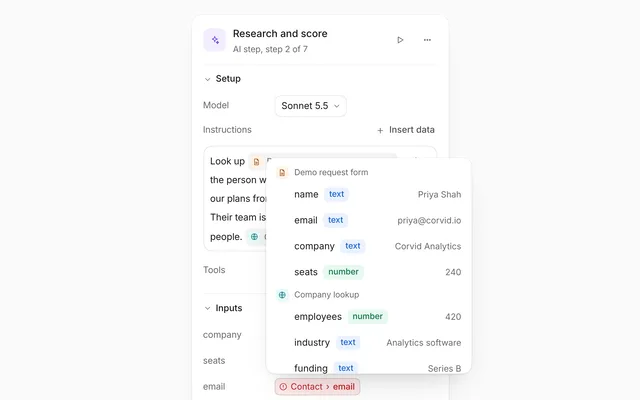
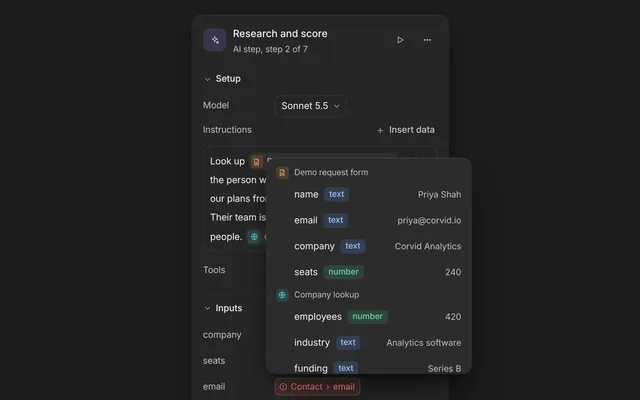
Data picker maps data from earlier steps of a workflow into a step's inputs. Each input holds tokens, the earlier step and then its field, with a button to remove each one, and a + that opens the picker: only the fields that earlier steps hand on, grouped by step under the step's coloured tile, each with its type as a coloured chip and a sample value. A search filters them, the arrow keys move through them and Enter puts the one picked in.
- In a workflow or automation builder, where a step's inputs (an email's To, Subject and Body) come from what earlier steps found.
- When people should only ever pick data that exists by the time the step runs.
- When fields need their type and a real sample to tell apart, like the company name from a form and the company record from a lookup.
- Beside a step inspector, for the inputs of the step that is picked.
- The step being set up sits on top with its tile, its name and where it sits. Under it, each input has its label and a box of tokens.
- A token shows the earlier step's tile in its kind's colour, the step's name and the field. The step's name gives way first when there is no room, so the field stays whole. Each token has a remove button.
- The + at the end of an input opens the picker under it. On designme.dev the inputs glide up as it opens, so the inputs and the picker stay centred together.
- The picker lists only the fields of the earlier steps, grouped by step in their order, each group with the step's tile, its name and its place. Each field shows its type as a coloured chip, text blue, numbers green, lists orange, objects pink, yes or no yellow and dates teal, and a sample value.
- Search matches a field's name or its step's name, and underlines the part of a field's name that matched. The up and down arrows move through the fields and wrap, the pointer moves the highlight too, and Enter or a click puts the field in the input it was opened from.
- A field already in the input isn't added twice; the live region says so.
- A note under the list says where the fields come from, with the keys that work in it.
- In React,
fieldsandonFieldsChangehold the inputs and what is mapped into each,sourcesis the earlier steps, andopen,queryandactivecan drive the picker from your own state.
- Each input's box is a labelled group. Each + is labelled "Insert data into Body", with
aria-haspopup="dialog"andaria-expanded, and each remove button "Remove email from Demo request form". Both show tooltips. - The picker is a labelled dialog. Its search is a
comboboxthat controls alistboxof options in labelled groups, and points at the highlighted field witharia-activedescendant. Each option is labelled with the field, its type and its step. - A click on + puts the focus in the search. Escape closes the picker and gives the focus back to its +, and so does picking a field from the keyboard.
- Removing a token with the keyboard moves the focus to its input's +, so it never falls to the page.
- A polite live region says what was added or removed, like "Added reasons from Research and score to Body".
- With reduced motion new tokens appear and removed ones go without their animation.
Usage
Import it in React and drive it from your own state, or place it in an Astro page.
React
import { DataPicker } from '@/components/designme/data-picker/DataPicker';React example
The demo above as a React component, 37 lines you can copy.
'use client';
// The animated preview from designme.dev, rebuilt from the React component: an example of driving it from your own state.
import { useRef, useState } from 'react';
import { DataPicker, type DataPickerField, type DataPickerSource } from './DataPicker';
import { useStory } from '../lib/useScript';

/* ---------- Data picker: a field comes out of the subject, then Body's picker searches "sc", moves down to the reasons
   and puts them in ---------- */
const SOURCES: DataPickerSource[] = [
  { id: 'form', title: 'Demo request form', kind: 'trigger', icon: 'file-text', fields: [{ name: 'name', type: 'text', sample: 'Priya Shah' }, { name: 'email', type: 'text', sample: '[email protected]' }, { name: 'company', type: 'text', sample: 'Corvid Analytics' }, { name: 'seats', type: 'number', sample: '240' }, { name: 'sent_at', type: 'date', sample: 'Nov 8, 10:41' }] },
  { id: 'lookup', title: 'Company lookup', kind: 'tool', icon: 'globe', fields: [{ name: 'employees', type: 'number', sample: '420' }, { name: 'industry', type: 'text', sample: 'Analytics software' }, { name: 'verified', type: 'bool', sample: 'true' }] },
  { id: 'research', title: 'Research and score', kind: 'ai', icon: 'spark', fields: [{ name: 'score', type: 'number', sample: '84' }, { name: 'tier', type: 'text', sample: 'Enterprise' }, { name: 'reasons', type: 'list', sample: '3 reasons' }, { name: 'company', type: 'object', sample: '{ 5 fields }' }] },
  { id: 'reply', title: 'Draft a reply', kind: 'ai', icon: 'edit', fields: [{ name: 'subject', type: 'text', sample: 'Your demo with Fernhill' }, { name: 'body', type: 'text', sample: 'Hi Priya, thanks for writing' }] }
];
const FIELDS: DataPickerField[] = [{ key: 'to', label: 'To', refs: ['form.email'] }, { key: 'subject', label: 'Subject', refs: ['reply.subject', 'form.company'] }, { key: 'body', label: 'Body', refs: ['reply.body'] }];

export default function DataPickerDemo() {
  const ref = useRef<HTMLDivElement>(null);
  const [fields, setFields] = useState(FIELDS);
  const [open, setOpen] = useState<string | null>(null);
  const [query, setQuery] = useState('');
  const [active, setActive] = useState(0);
  useStory(ref, async ({ wait, press }) => {
    await wait(1500); press('[aria-label="Remove company from Demo request form"]');
    await wait(1000); press('[data-add="body"]');
    await wait(700); setQuery('s'); await wait(150); setQuery('sc');
    await wait(600); setActive(1); await wait(400); setActive(2);
    await wait(700); press('.dm-fpk-o.dm-on');
  });
  return (
    <div ref={ref} style={{ width: '100%', minHeight: 420 }}>
      <DataPicker sources={SOURCES} fields={fields} onFieldsChange={setFields} step={{ title: 'Send the reply', kind: 'app', icon: 'mail', position: 'Step 6 of 7' }}
        open={open} onOpenChange={setOpen} query={query} onQueryChange={setQuery} active={active} onActiveChange={setActive} />
    </div>
  );
}
Astro
In a page in src/pages. It plays the demo above; change its data-picker.js to show your own data. Attributes like class go on its root element.
---
import DataPicker from '../components/designme/data-picker/DataPicker.astro';
---
<DataPicker />
<DataPicker data-style="soft" class="my-class" />Props
Everything DataPicker takes.
| Prop | Type | What it does |
|---|---|---|
sourcesrequired | DataPickerSource[] | The steps before this one, in order: the picker offers only their fields |
fields | DataPickerField[] | The step's inputs and what is mapped into each |
defaultFields | DataPickerField[] | |
onFieldsChange | (fields: DataPickerField[]) => void | |
step | { title: string; kind: DataPickerStepKind; icon?: IconName; position?: string } | The step being set up, over its fields |
open | string | null | The key of the field whose picker is open, or null |
defaultOpen | string | null | |
onOpenChange | (open: string | null) => void | |
query | string | What the search holds |
onQueryChange | (query: string) => void | |
active | number | The option the arrows are on, counted through the filtered list |
onActiveChange | (active: number) => void | |
note | ReactNode | Said under the list, like "From the 4 steps before Send the reply" |
className | string |
Code
The full source, as the CLI installs it.
DataPicker.tsxReact · 154 lines
'use client';
import { useId, useRef, useState, type ReactNode } from 'react';
import { cx } from '../lib/cx';
import { useControllable, useIsoLayoutEffect } from '../lib/hooks';
import { Icon, type IconName } from '../lib/icons';
import { Tip } from '../lib/motion';
import '../designme.css';
import './data-picker.css';

/** The kinds of step, each with its colour on its tile: the trigger orange, AI steps violet, tools teal, app steps and outputs
    blue, a branch yellow, a wait pink, an approval green */
export type DataPickerStepKind = 'trigger' | 'ai' | 'tool' | 'app' | 'output' | 'branch' | 'wait' | 'approval';
/** Each type has its colour: text blue, numbers green, lists orange, objects pink, yes or no yellow, dates teal */
export type DataPickerType = 'text' | 'number' | 'list' | 'object' | 'bool' | 'date';
/** An earlier step and what it hands on. A field is referred to as `"<step id>.<field name>"` */
export interface DataPickerSource {
  id: string;
  title: string;
  kind: DataPickerStepKind;
  icon?: IconName;
  fields: { name: string; type: DataPickerType; sample?: string }[];
}
/** One of the step's inputs and the fields mapped into it, in order */
export interface DataPickerField {
  key: string;
  label: string;
  refs: string[];
}

export interface DataPickerProps {
  /** The steps before this one, in order: the picker offers only their fields */
  sources: DataPickerSource[];
  /** The step's inputs and what is mapped into each */
  fields?: DataPickerField[];
  defaultFields?: DataPickerField[];
  onFieldsChange?: (fields: DataPickerField[]) => void;
  /** The step being set up, over its fields */
  step?: { title: string; kind: DataPickerStepKind; icon?: IconName; position?: string };
  /** The key of the field whose picker is open, or null */
  open?: string | null;
  defaultOpen?: string | null;
  onOpenChange?: (open: string | null) => void;
  /** What the search holds */
  query?: string;
  onQueryChange?: (query: string) => void;
  /** The option the arrows are on, counted through the filtered list */
  active?: number;
  onActiveChange?: (active: number) => void;
  /** Said under the list, like "From the 4 steps before Send the reply" */
  note?: ReactNode;
  className?: string;
}

const KIND_ICON: Record<DataPickerStepKind, IconName> = { trigger: 'bolt', ai: 'spark', tool: 'globe', app: 'send', output: 'hash', branch: 'branch', wait: 'clock', approval: 'user' };
const TONE: Record<DataPickerType, string> = { text: 'dm-b', number: 'dm-m', list: 'dm-p', object: 'dm-k', bool: 'dm-y', date: 'dm-t' };
const Tile = ({ kind, icon }: { kind: DataPickerStepKind; icon?: IconName }) => <span className="dm-fpk-ti" data-k={kind} aria-hidden="true"><Icon name={icon ?? KIND_ICON[kind]} size="xs" /></span>;
const mark = (t: string, v: string) => { const i = v ? t.toLowerCase().indexOf(v) : -1; return i < 0 ? t : <>{t.slice(0, i)}<mark>{t.slice(i, i + v.length)}</mark>{t.slice(i + v.length)}</>; };

/** Maps data from earlier steps into a step's inputs: each input holds tokens, the step and then its field, and a + opens a
    picker of what earlier steps hand on, grouped by step, with each field's type in colour and a sample, a search and the
    arrow keys. */
export function DataPicker({ sources, fields, defaultFields = [], onFieldsChange, step, open, defaultOpen = null, onOpenChange, query, onQueryChange, active, onActiveChange, note, className }: DataPickerProps) {
  const [list, setList] = useControllable(fields, defaultFields, onFieldsChange);
  const [openKey, setOpen] = useControllable<string | null>(open, defaultOpen, onOpenChange);
  const [q, setQ] = useControllable(query, '', onQueryChange);
  const [hi, setHi] = useControllable(active, 0, onActiveChange);
  const [said, setSaid] = useState('');
  // the fields mapped from the start show as they are; ones added later pop in
  const [first] = useState(() => new Set((fields ?? defaultFields).flatMap(f => f.refs.map(r => f.key + '|' + r))));
  const uid = useId().replace(/:/g, '');
  const root = useRef<HTMLDivElement>(null), pop = useRef<HTMLDivElement>(null), input = useRef<HTMLInputElement>(null), lsRef = useRef<HTMLDivElement>(null);
  const [place, setPlace] = useState<{ top: number; left: number } | null>(null);
  const of = (ref: string) => { const [s, f] = ref.split('.'); return { src: sources.find(x => x.id === s), f }; };

  const v = q.trim().toLowerCase();
  const groups = sources.map((src, si) => ({ src, si, fs: src.fields.filter(f => !v || f.name.toLowerCase().includes(v) || src.title.toLowerCase().includes(v)) })).filter(g => g.fs.length);
  const items = groups.flatMap(g => g.fs.map(f => g.src.id + '.' + f.name));
  const at = items.length ? ((hi % items.length) + items.length) % items.length : 0;
  const target = list.find(f => f.key === openKey);

  // the picker opens under the + of its field, inside the component
  useIsoLayoutEffect(() => {
    if (!openKey || !root.current || !pop.current) { setPlace(null); return; }
    const b = root.current.querySelector<HTMLElement>(`[data-add="${CSS.escape(openKey)}"]`); if (!b) return;
    const rr = root.current.getBoundingClientRect(), br = b.getBoundingClientRect();
    setPlace({ top: br.bottom - rr.top + 6, left: Math.max(-rr.left + 8, Math.min(br.right - rr.left - pop.current.offsetWidth, innerWidth - rr.left - pop.current.offsetWidth - 8)) });
  }, [openKey]);
  useIsoLayoutEffect(() => { lsRef.current?.querySelector('.dm-on')?.scrollIntoView({ block: 'nearest' }); }, [at, v]);
  // a click outside or Escape closes it, and the focus goes back to the + when it was inside
  useIsoLayoutEffect(() => {
    if (!openKey) return;
    const down = (e: PointerEvent) => { const t = e.target as Node; if (!pop.current?.contains(t) && !(t as Element).closest?.(`[data-add="${CSS.escape(openKey)}"]`)) setOpen(null); };
    document.addEventListener('pointerdown', down); return () => document.removeEventListener('pointerdown', down);
  }, [openKey]);
  const close = (focus: boolean) => { const k = openKey; setOpen(null); if (focus && k) root.current?.querySelector<HTMLElement>(`[data-add="${CSS.escape(k)}"]`)?.focus({ preventScroll: true }); };
  const openFor = (key: string, viaKeyboard: boolean) => { if (openKey === key) { close(false); return; } setQ(''); setHi(0); setOpen(key); setTimeout(() => input.current?.focus({ preventScroll: true }), viaKeyboard ? 0 : 30); };
  const pick = (ref: string | undefined) => {
    if (!ref || !target) return; const { src, f } = of(ref), inside = !!pop.current?.contains(document.activeElement);
    close(inside);
    if (target.refs.includes(ref)) { setSaid(`${target.label} already has ${f} from ${src?.title}`); return; }
    setList(list.map(x => x.key === target.key ? { ...x, refs: [...x.refs, ref] } : x)); setSaid(`Added ${f} from ${src?.title} to ${target.label}`);
  };
  const remove = (key: string, ref: string) => { const { src, f } = of(ref); setList(list.map(x => x.key === key ? { ...x, refs: x.refs.filter(r => r !== ref) } : x)); setSaid(`Removed ${f} from ${src?.title}`); };

  let n = 0;
  return (
    <div data-dm="" ref={root} className={cx('dm-fpk', className)}>
      {step && <div className="dm-fpk-hd"><Tile kind={step.kind} icon={step.icon} /><b>{step.title}</b>{step.position && <span className="dm-muted">{step.position}</span>}</div>}
      {list.map(fd => (
        <div className="dm-fpk-f" key={fd.key}>
          <span className="dm-fpk-l">{fd.label}</span>
          <div className="dm-fpk-box" role="group" aria-label={fd.label}>
            {fd.refs.length ? fd.refs.map(ref => { const { src, f } = of(ref); return (
              <span className={cx('dm-fpk-tok', !first.has(fd.key + '|' + ref) && 'dm-new')} key={ref}>
                {src && <Tile kind={src.kind} icon={src.icon} />}<span className="dm-s">{src?.title ?? ref.split('.')[0]}</span><span className="dm-sep" aria-hidden="true">›</span><span className="dm-f">{f}</span>
                <Tip label="Remove"><button type="button" className="dm-fpk-x" aria-label={`Remove ${f} from ${src?.title ?? ref.split('.')[0]}`} onClick={e => { remove(fd.key, ref); if (e.detail === 0) root.current?.querySelector<HTMLElement>(`[data-add="${CSS.escape(fd.key)}"]`)?.focus(); }}><Icon name="x" size="xs" /></button></Tip>
              </span>); }) : <span className="dm-fpk-ph">Pick data from an earlier step</span>}
            <Tip label="Insert data" off={openKey === fd.key}>
              <button type="button" className="dm-fpk-add" data-add={fd.key} aria-haspopup="dialog" aria-expanded={openKey === fd.key} aria-label={`Insert data into ${fd.label}`} onClick={e => openFor(fd.key, e.detail === 0)}><Icon name="plus" /></button>
            </Tip>
          </div>
        </div>
      ))}
      <div ref={pop} className={cx('dm-pop dm-fpk-pop', openKey && place && 'dm-open')} style={place ?? undefined} role="dialog" aria-label={target ? `Pick data for ${target.label}` : 'Pick data from an earlier step'} inert={!openKey}>
        <div className="dm-fpk-q">
          <Icon name="search" />
          <input ref={input} type="text" role="combobox" aria-expanded="true" aria-autocomplete="list" aria-controls={`${uid}-ls`} aria-activedescendant={items.length ? `${uid}-o${at}` : undefined}
            placeholder="Find a field" aria-label="Find a field" autoComplete="off" spellCheck={false} value={q}
            onChange={e => { setQ(e.target.value); setHi(0); }}
            onKeyDown={e => {
              if (e.key === 'ArrowDown' || e.key === 'ArrowUp') { e.preventDefault(); setHi(at + (e.key === 'ArrowDown' ? 1 : -1)); }
              else if (e.key === 'Enter') { e.preventDefault(); pick(items[at]); }
              else if (e.key === 'Escape') { e.preventDefault(); close(true); }
            }} />
        </div>
        <div className="dm-fpk-ls" id={`${uid}-ls`} role="listbox" aria-label="Fields from earlier steps" ref={lsRef}>
          {groups.length ? groups.map(({ src, si, fs }) => (
            <div role="group" aria-labelledby={`${uid}-g${si}`} key={src.id}>
              <div className="dm-fpk-g" id={`${uid}-g${si}`}><Tile kind={src.kind} icon={src.icon} /><b>{src.title}</b><span className="dm-n">Step {si + 1}</span></div>
              {fs.map(f => { const i = n++, ref = src.id + '.' + f.name; return (
                <div key={ref} className={cx('dm-fpk-o', i === at && 'dm-on')} role="option" id={`${uid}-o${i}`} aria-selected={i === at} aria-label={`${f.name}, ${f.type}, from ${src.title}`}
                  data-ref={ref} onPointerMove={() => { if (i !== at) setHi(i); }} onClick={() => pick(ref)}>
                  <span className="dm-k">{mark(f.name, v)}</span><span className={cx('dm-tag', TONE[f.type])}>{f.type}</span><span className="dm-ex">{f.sample}</span>
                </div>); })}
            </div>
          )) : <p className="dm-fpk-e">No field matches “{q.trim()}”</p>}
        </div>
        <p className="dm-fpk-ft"><span>{note ?? `From the ${sources.length} ${sources.length === 1 ? 'step' : 'steps'} before ${step?.title ?? 'this one'}`}</span><span className="dm-kh" aria-hidden="true"><span className="dm-kbd">↑</span> <span className="dm-kbd">↓</span> <span className="dm-kbd">↵</span></span></p>
      </div>
      <p className="dm-fpk-live" aria-live="polite">{said}</p>
    </div>
  );
}
data-picker.cssReact · 64 lines
/* Generated from designme.dev by scripts/sync.mjs. Edit the site, then sync. */
/* ---------- Data picker ---------- */
/* maps data from earlier steps into a step's fields. Each field holds tokens, the step and then its field, and a + that opens
   the picker: only what earlier steps hand on, grouped by step under each step's tile in its kind's colour, each field with
   its type as a coloured chip and a sample value. Search filters it, the arrows move through it and Enter puts the field in */
.dm-fpk{position:relative;width:100%;max-width:var(--dm-field-w);container:fpk/inline-size;margin-inline:auto;display:flex;flex-direction:column;gap:var(--dm-s-3);text-align:left}
.dm-fpk-hd{display:flex;align-items:center;gap:var(--dm-s-2);font-size:13px}
.dm-fpk-hd b{font-weight:500}
.dm-fpk-hd .dm-muted{margin-left:auto;font-size:12px}
.dm-fpk-ti{width:18px;height:18px;flex:none;display:grid;place-items:center;border-radius:calc(5px * var(--dm-rk));background:var(--dm-fpk-kb,var(--dm-chip));color:var(--dm-fpk-kf,var(--dm-fg2))}
.dm-fpk-ti .dm-i{width:11px;height:11px}
.dm-fpk-hd .dm-fpk-ti{width:24px;height:24px;border-radius:calc(7px * var(--dm-rk))}
.dm-fpk-hd .dm-fpk-ti .dm-i{width:12px;height:12px}
.dm-fpk-ti[data-k="trigger"]{--dm-fpk-kb:var(--dm-pp-bg);--dm-fpk-kf:var(--dm-pp)}
.dm-fpk-ti[data-k="ai"]{--dm-fpk-kb:var(--dm-pl-bg);--dm-fpk-kf:var(--dm-pl)}
.dm-fpk-ti[data-k="tool"]{--dm-fpk-kb:var(--dm-pt-bg);--dm-fpk-kf:var(--dm-pt)}
.dm-fpk-ti:is([data-k="app"],[data-k="output"]){--dm-fpk-kb:var(--dm-pb-bg);--dm-fpk-kf:var(--dm-pb)}
.dm-fpk-ti[data-k="branch"]{--dm-fpk-kb:var(--dm-py-bg);--dm-fpk-kf:var(--dm-py)}
.dm-fpk-ti[data-k="wait"]{--dm-fpk-kb:var(--dm-pk-bg);--dm-fpk-kf:var(--dm-pk)}
.dm-fpk-ti[data-k="approval"]{--dm-fpk-kb:var(--dm-pm-bg);--dm-fpk-kf:var(--dm-pm)}
.dm-fpk-f{display:flex;flex-direction:column;gap:6px}
.dm-fpk-l{font-size:12.5px;color:var(--dm-muted)}
.dm-fpk-box{display:flex;flex-wrap:wrap;align-items:center;gap:6px;min-height:var(--dm-field-h);padding:5px 5px 5px var(--dm-s-2);border-radius:var(--dm-r-field);background:var(--dm-surface);box-shadow:inset 0 0 0 1px color-mix(in srgb,var(--dm-field-line) 50%,transparent);transition:box-shadow var(--dm-t-fast)}
@supports (corner-shape:squircle){.dm-fpk-box{corner-shape:squircle;border-radius:var(--dm-r-field-sq)}}
.dm-fpk-box:has([aria-expanded="true"]){box-shadow:inset 0 0 0 1px color-mix(in srgb,var(--dm-field-line-strong) 50%,transparent)}
.dm-fpk-ph{font-size:13px;color:var(--dm-muted)}
.dm-fpk-tok{display:inline-flex;align-items:center;gap:5px;max-width:100%;min-width:0;height:26px;padding:0 2px 0 4px;border-radius:var(--dm-r-sm);background:var(--dm-chip);font-size:12px;color:var(--dm-fg);white-space:nowrap}
.dm-fpk-tok .dm-s{min-width:0;max-width:120px;color:var(--dm-muted);overflow:hidden;text-overflow:ellipsis}
.dm-fpk-tok .dm-sep{color:var(--dm-muted)}
.dm-fpk-tok .dm-f{flex:none;max-width:100%;font-weight:500;overflow:hidden;text-overflow:ellipsis}
.dm-fpk-tok.dm-new{animation:dm-popin .5s var(--dm-ease) backwards}
.dm-fpk-tok.dm-out{animation:dm-leave .3s var(--dm-ease) both}
.dm-fpk-x{width:20px;height:20px;flex:none;display:grid;place-items:center;border-radius:calc(5px * var(--dm-rk));color:var(--dm-muted);transition:background var(--dm-t-fast),color var(--dm-t-fast)}
@media (hover:hover) and (pointer:fine){.dm-fpk-x:hover{background:var(--dm-surface);color:var(--dm-fg)}}
.dm-fpk-add{width:26px;height:26px;flex:none;display:grid;place-items:center;margin-left:auto;border-radius:var(--dm-r-sm);color:var(--dm-muted);transition:background var(--dm-t-fast),color var(--dm-t-fast)}
.dm-fpk-add[aria-expanded="true"]{background:var(--dm-row);color:var(--dm-fg)}
@media (hover:hover) and (pointer:fine){.dm-fpk-add:hover{background:var(--dm-row);color:var(--dm-fg)}}
/* the picker */
.dm-fpk-pop.dm-pop{width:min(320px,100cqi,calc(100vw - 32px));padding:var(--dm-s-2);display:flex;flex-direction:column;gap:var(--dm-s-1)}
.dm-fpk-q{display:flex;align-items:center;gap:var(--dm-s-2);height:36px;padding:0 10px;border-radius:var(--dm-r-field);background:var(--dm-surface);box-shadow:inset 0 0 0 1px color-mix(in srgb,var(--dm-field-line) 50%,transparent);color:var(--dm-muted);transition:box-shadow var(--dm-t-fast)}
@supports (corner-shape:squircle){.dm-fpk-q{corner-shape:squircle;border-radius:var(--dm-r-field-sq)}}
.dm-fpk-q:focus-within{box-shadow:inset 0 0 0 1px color-mix(in srgb,var(--dm-field-line-strong) 50%,transparent)}
.dm-fpk-q input{flex:1;min-width:0;height:100%;border:0;outline:0;background:none;font:inherit;font-size:13px;color:var(--dm-fg)}
.dm-fpk-q input::placeholder{color:var(--dm-muted)}
.dm-fpk-ls{max-height:252px;overflow-y:auto;overscroll-behavior:contain;scrollbar-width:thin;scrollbar-color:var(--dm-rail) transparent}
.dm-fpk-g{display:flex;align-items:center;gap:var(--dm-s-2);padding:var(--dm-s-2) 6px var(--dm-s-1);font-size:12px;color:var(--dm-muted)}
.dm-fpk-g b{min-width:0;font-weight:500;color:var(--dm-fg2);white-space:nowrap;overflow:hidden;text-overflow:ellipsis}
.dm-fpk-g .dm-n{margin-left:auto;flex:none}
.dm-fpk-o{display:grid;grid-template-columns:auto auto minmax(0,1fr);align-items:center;gap:var(--dm-s-2);height:32px;padding:0 var(--dm-s-2) 0 32px;border-radius:var(--dm-r-sm);font-size:13px;cursor:pointer;user-select:none}
.dm-fpk-o.dm-on{background:var(--dm-row)}
.dm-fpk-o .dm-k{white-space:nowrap}
.dm-fpk-o .dm-k mark{background:none;color:inherit;font-weight:500;text-decoration:underline;text-decoration-color:var(--dm-faint);text-underline-offset:2px}
.dm-fpk-o .dm-ex{min-width:0;text-align:right;font-size:12px;color:var(--dm-muted);white-space:nowrap;overflow:hidden;text-overflow:ellipsis}
.dm-fpk-o .dm-tag{font-weight:500}
.dm-fpk-e{margin:0;padding:var(--dm-s-4) var(--dm-s-2);font-size:12.5px;color:var(--dm-muted)}
.dm-fpk-ft{display:flex;align-items:center;gap:var(--dm-s-2);margin:0;padding:6px 6px 2px;border-top:1px solid color-mix(in srgb,var(--dm-line) 50%,transparent);font-size:12px;color:var(--dm-muted)}
.dm-fpk-ft .dm-kbd{margin-right:-4px}
.dm-fpk-ft span:first-child{flex:1;min-width:0;white-space:nowrap;overflow:hidden;text-overflow:ellipsis}
.dm-fpk-live{position:absolute;width:1px;height:1px;margin:-1px;padding:0;overflow:hidden;clip-path:inset(50%);white-space:nowrap}
@media (prefers-reduced-motion:reduce){.dm-fpk-tok.dm-new,.dm-fpk-tok.dm-out{animation:none!important}}
@container fpk (max-width:300px){.dm-fpk-ft .dm-kh{display:none}}
:root:not([data-style="soft"]) .dm-fpk-ti:not(:where([data-style="soft"],[data-style="soft"] *)){box-shadow:inset 0 0 0 1px color-mix(in srgb,var(--dm-fpk-kf,var(--dm-rail)) 30%,transparent)}
:root:not([data-style="soft"]) .dm-fpk-tok:not(:where([data-style="soft"],[data-style="soft"] *)){background:var(--dm-surface);box-shadow:inset 0 0 0 1px color-mix(in srgb,var(--dm-rail) 60%,transparent)}
DataPicker.astroAstro · 35 lines
---
// Generated from designme.dev by scripts/sync.mjs. Edit the site, then sync.
// Data picker: Map a field from earlier steps into a step's input.
// The markup, CSS and script are designme.dev's own, run by the shared core in ../core, which mounts the component when it scrolls
// into view and plays its demo. To show your own data, change data-picker.js. The markup is kept exactly as it is (is:raw).
import type { HTMLAttributes } from 'astro/types';
import '../core/designme.css';
import './data-picker.css';

export interface Props extends HTMLAttributes<'div'> {
  /** "soft" draws it in the Soft style. Leave it out for Blueprint, or for the style set on <html> (data-style="soft") */
  'data-style'?: 'soft';
}
const { class: className, ...rest } = Astro.props;
---
<div class:list={['card', className]} data-c="data-picker" {...rest}>
  <div class="stage-in"><Fragment is:raw>
<div class="fpk">
  <div class="fpk-hd"><span class="fpk-ti" data-k="app" aria-hidden="true"><svg class="i s"><use href="#i-mail"/></svg></span><b>Send the reply</b><span class="muted">Step 6 of 7</span></div>
  <div class="fpk-f" data-f="to"><span class="fpk-l">To</span><div class="fpk-box" role="group" aria-label="To"></div></div>
  <div class="fpk-f" data-f="subject"><span class="fpk-l">Subject</span><div class="fpk-box" role="group" aria-label="Subject"></div></div>
  <div class="fpk-f" data-f="body"><span class="fpk-l">Body</span><div class="fpk-box" role="group" aria-label="Body"></div></div>
  <div class="pop fpk-pop" role="dialog" aria-label="Pick data from an earlier step">
    <div class="fpk-q"><svg class="i s"><use href="#i-search"/></svg><input type="text" role="combobox" aria-expanded="true" aria-autocomplete="list" placeholder="Find a field" aria-label="Find a field" autocomplete="off" spellcheck="false"></div>
    <div class="fpk-ls" role="listbox" aria-label="Fields from earlier steps"></div>
    <p class="fpk-ft"><span>From the 4 steps before Send the reply</span><span class="kh" aria-hidden="true"><span class="kbd">↑</span> <span class="kbd">↓</span> <span class="kbd">↵</span></span></p>
  </div>
  <p class="fpk-live" aria-live="polite"></p>
</div>
  </Fragment></div>
</div>
<script>
  import './data-picker.js';
</script>
data-picker.htmlHTML · 17 lines
<div class="card" data-c="data-picker">
  <div class="stage-in">
    <div class="fpk">
      <div class="fpk-hd"><span class="fpk-ti" data-k="app" aria-hidden="true"><svg class="i s"><use href="#i-mail"/></svg></span><b>Send the reply</b><span class="muted">Step 6 of 7</span></div>
      <div class="fpk-f" data-f="to"><span class="fpk-l">To</span><div class="fpk-box" role="group" aria-label="To"></div></div>
      <div class="fpk-f" data-f="subject"><span class="fpk-l">Subject</span><div class="fpk-box" role="group" aria-label="Subject"></div></div>
      <div class="fpk-f" data-f="body"><span class="fpk-l">Body</span><div class="fpk-box" role="group" aria-label="Body"></div></div>
      <div class="pop fpk-pop" role="dialog" aria-label="Pick data from an earlier step">
        <div class="fpk-q"><svg class="i s"><use href="#i-search"/></svg><input type="text" role="combobox" aria-expanded="true" aria-autocomplete="list" placeholder="Find a field" aria-label="Find a field" autocomplete="off" spellcheck="false"></div>
        <div class="fpk-ls" role="listbox" aria-label="Fields from earlier steps"></div>
        <p class="fpk-ft"><span>From the 4 steps before Send the reply</span><span class="kh" aria-hidden="true"><span class="kbd">↑</span> <span class="kbd">↓</span> <span class="kbd">↵</span></span></p>
      </div>
      <p class="fpk-live" aria-live="polite"></p>
    </div>
  </div>
</div>
data-picker.cssHTML · 63 lines
/* ---------- Data picker ---------- */
/* maps data from earlier steps into a step's fields. Each field holds tokens, the step and then its field, and a + that opens
   the picker: only what earlier steps hand on, grouped by step under each step's tile in its kind's colour, each field with
   its type as a coloured chip and a sample value. Search filters it, the arrows move through it and Enter puts the field in */
.fpk{position:relative;width:100%;max-width:var(--dm-field-w);container:fpk/inline-size;margin-inline:auto;display:flex;flex-direction:column;gap:var(--dm-s-3);text-align:left}
.fpk-hd{display:flex;align-items:center;gap:var(--dm-s-2);font-size:13px}
.fpk-hd b{font-weight:500}
.fpk-hd .muted{margin-left:auto;font-size:12px}
.fpk-ti{width:18px;height:18px;flex:none;display:grid;place-items:center;border-radius:calc(5px * var(--dm-rk));background:var(--dm-fpk-kb,var(--dm-chip));color:var(--dm-fpk-kf,var(--dm-fg2))}
.fpk-ti .i{width:11px;height:11px}
.fpk-hd .fpk-ti{width:24px;height:24px;border-radius:calc(7px * var(--dm-rk))}
.fpk-hd .fpk-ti .i{width:12px;height:12px}
.fpk-ti[data-k="trigger"]{--dm-fpk-kb:var(--dm-pp-bg);--dm-fpk-kf:var(--dm-pp)}
.fpk-ti[data-k="ai"]{--dm-fpk-kb:var(--dm-pl-bg);--dm-fpk-kf:var(--dm-pl)}
.fpk-ti[data-k="tool"]{--dm-fpk-kb:var(--dm-pt-bg);--dm-fpk-kf:var(--dm-pt)}
.fpk-ti:is([data-k="app"],[data-k="output"]){--dm-fpk-kb:var(--dm-pb-bg);--dm-fpk-kf:var(--dm-pb)}
.fpk-ti[data-k="branch"]{--dm-fpk-kb:var(--dm-py-bg);--dm-fpk-kf:var(--dm-py)}
.fpk-ti[data-k="wait"]{--dm-fpk-kb:var(--dm-pk-bg);--dm-fpk-kf:var(--dm-pk)}
.fpk-ti[data-k="approval"]{--dm-fpk-kb:var(--dm-pm-bg);--dm-fpk-kf:var(--dm-pm)}
.fpk-f{display:flex;flex-direction:column;gap:6px}
.fpk-l{font-size:12.5px;color:var(--dm-muted)}
.fpk-box{display:flex;flex-wrap:wrap;align-items:center;gap:6px;min-height:var(--dm-field-h);padding:5px 5px 5px var(--dm-s-2);border-radius:var(--dm-r-field);background:var(--dm-surface);box-shadow:inset 0 0 0 1px color-mix(in srgb,var(--dm-field-line) 50%,transparent);transition:box-shadow var(--dm-t-fast)}
@supports (corner-shape:squircle){.fpk-box{corner-shape:squircle;border-radius:var(--dm-r-field-sq)}}
.fpk-box:has([aria-expanded="true"]){box-shadow:inset 0 0 0 1px color-mix(in srgb,var(--dm-field-line-strong) 50%,transparent)}
.fpk-ph{font-size:13px;color:var(--dm-muted)}
.fpk-tok{display:inline-flex;align-items:center;gap:5px;max-width:100%;min-width:0;height:26px;padding:0 2px 0 4px;border-radius:var(--dm-r-sm);background:var(--dm-chip);font-size:12px;color:var(--dm-fg);white-space:nowrap}
.fpk-tok .s{min-width:0;max-width:120px;color:var(--dm-muted);overflow:hidden;text-overflow:ellipsis}
.fpk-tok .sep{color:var(--dm-muted)}
.fpk-tok .f{flex:none;max-width:100%;font-weight:500;overflow:hidden;text-overflow:ellipsis}
.fpk-tok.new{animation:popin .5s var(--dm-ease) backwards}
.fpk-tok.out{animation:leave .3s var(--dm-ease) both}
.fpk-x{width:20px;height:20px;flex:none;display:grid;place-items:center;border-radius:calc(5px * var(--dm-rk));color:var(--dm-muted);transition:background var(--dm-t-fast),color var(--dm-t-fast)}
@media (hover:hover) and (pointer:fine){.fpk-x:hover{background:var(--dm-surface);color:var(--dm-fg)}}
.fpk-add{width:26px;height:26px;flex:none;display:grid;place-items:center;margin-left:auto;border-radius:var(--dm-r-sm);color:var(--dm-muted);transition:background var(--dm-t-fast),color var(--dm-t-fast)}
.fpk-add[aria-expanded="true"]{background:var(--dm-row);color:var(--dm-fg)}
@media (hover:hover) and (pointer:fine){.fpk-add:hover{background:var(--dm-row);color:var(--dm-fg)}}
/* the picker */
.fpk-pop.pop{width:min(320px,100cqi,calc(100vw - 32px));padding:var(--dm-s-2);display:flex;flex-direction:column;gap:var(--dm-s-1)}
.fpk-q{display:flex;align-items:center;gap:var(--dm-s-2);height:36px;padding:0 10px;border-radius:var(--dm-r-field);background:var(--dm-surface);box-shadow:inset 0 0 0 1px color-mix(in srgb,var(--dm-field-line) 50%,transparent);color:var(--dm-muted);transition:box-shadow var(--dm-t-fast)}
@supports (corner-shape:squircle){.fpk-q{corner-shape:squircle;border-radius:var(--dm-r-field-sq)}}
.fpk-q:focus-within{box-shadow:inset 0 0 0 1px color-mix(in srgb,var(--dm-field-line-strong) 50%,transparent)}
.fpk-q input{flex:1;min-width:0;height:100%;border:0;outline:0;background:none;font:inherit;font-size:13px;color:var(--dm-fg)}
.fpk-q input::placeholder{color:var(--dm-muted)}
.fpk-ls{max-height:252px;overflow-y:auto;overscroll-behavior:contain;scrollbar-width:thin;scrollbar-color:var(--dm-rail) transparent}
.fpk-g{display:flex;align-items:center;gap:var(--dm-s-2);padding:var(--dm-s-2) 6px var(--dm-s-1);font-size:12px;color:var(--dm-muted)}
.fpk-g b{min-width:0;font-weight:500;color:var(--dm-fg2);white-space:nowrap;overflow:hidden;text-overflow:ellipsis}
.fpk-g .n{margin-left:auto;flex:none}
.fpk-o{display:grid;grid-template-columns:auto auto minmax(0,1fr);align-items:center;gap:var(--dm-s-2);height:32px;padding:0 var(--dm-s-2) 0 32px;border-radius:var(--dm-r-sm);font-size:13px;cursor:pointer;user-select:none}
.fpk-o.on{background:var(--dm-row)}
.fpk-o .k{white-space:nowrap}
.fpk-o .k mark{background:none;color:inherit;font-weight:500;text-decoration:underline;text-decoration-color:var(--dm-faint);text-underline-offset:2px}
.fpk-o .ex{min-width:0;text-align:right;font-size:12px;color:var(--dm-muted);white-space:nowrap;overflow:hidden;text-overflow:ellipsis}
.fpk-o .tag{font-weight:500}
.fpk-e{margin:0;padding:var(--dm-s-4) var(--dm-s-2);font-size:12.5px;color:var(--dm-muted)}
.fpk-ft{display:flex;align-items:center;gap:var(--dm-s-2);margin:0;padding:6px 6px 2px;border-top:1px solid color-mix(in srgb,var(--dm-line) 50%,transparent);font-size:12px;color:var(--dm-muted)}
.fpk-ft .kbd{margin-right:-4px}
.fpk-ft span:first-child{flex:1;min-width:0;white-space:nowrap;overflow:hidden;text-overflow:ellipsis}
.fpk-live{position:absolute;width:1px;height:1px;margin:-1px;padding:0;overflow:hidden;clip-path:inset(50%);white-space:nowrap}
@media (prefers-reduced-motion:reduce){.fpk-tok.new,.fpk-tok.out{animation:none!important}}
@container fpk (max-width:300px){.fpk-ft .kh{display:none}}
:root:not([data-style="soft"]) .fpk-ti:not(:where([data-style="soft"],[data-style="soft"] *)){box-shadow:inset 0 0 0 1px color-mix(in srgb,var(--dm-fpk-kf,var(--dm-rail)) 30%,transparent)}
:root:not([data-style="soft"]) .fpk-tok:not(:where([data-style="soft"],[data-style="soft"] *)){background:var(--dm-surface);box-shadow:inset 0 0 0 1px color-mix(in srgb,var(--dm-rail) 60%,transparent)}
data-picker.jsHTML · 85 lines
DM.def('data-picker', (r, c) => {
r.innerHTML = r.innerHTML.replace(/\{([\w-]+)(?:\.(xs))?\}/g, (m, k, z) => I(k, z || 's'));
const uid = 'fpk' + Math.random().toString(36).slice(2, 7);
const box = $('.fpk', r), pop = $('.fpk-pop', r), q = $('.fpk-q input', r), ls = $('.fpk-ls', r), live = $('.fpk-live', r);
// each data type has its colour: text blue, numbers green, lists orange, objects pink, yes or no yellow, dates teal
const TY = { text:'b', number:'m', list:'p', object:'k', bool:'y', date:'t' };
// the steps before Send the reply, in their order, and what each hands on: [field, type, sample]
const S = [
{ id:'form', t:'Demo request form', k:'trigger', ic:'file-text', f:[['name', 'text', 'Priya Shah'], ['email', 'text', '[email protected]'], ['company', 'text', 'Corvid Analytics'], ['seats', 'number', '240'], ['sent_at', 'date', 'Nov 8, 10:41']] },
{ id:'lookup', t:'Company lookup', k:'tool', ic:'globe', f:[['employees', 'number', '420'], ['industry', 'text', 'Analytics software'], ['verified', 'bool', 'true']] },
{ id:'research', t:'Research and score', k:'ai', ic:'spark', f:[['score', 'number', '84'], ['tier', 'text', 'Enterprise'], ['reasons', 'list', '3 reasons'], ['company', 'object', '{ 5 fields }']] },
{ id:'reply', t:'Draft a reply', k:'ai', ic:'edit', f:[['subject', 'text', 'Your demo with Fernhill'], ['body', 'text', 'Hi Priya, thanks for writing']] }
];
const F = { to:{ l:'To', v:['form.email'] }, subject:{ l:'Subject', v:['reply.subject', 'form.company'] }, body:{ l:'Body', v:['reply.body'] } };
let target = null, items = [], hi = 0;
ls.id = uid + '-ls'; q.setAttribute('aria-controls', ls.id);
const say = t => { live.textContent = ''; c.later(40, () => { live.textContent = t; }); };
const of = ref => { const [s, f] = ref.split('.'); return { st:S.find(x => x.id === s), f }; };
const tokHTML = ref => { const { st, f } = of(ref);
return `<span class="fpk-tok" data-ref="${ref}"><span class="fpk-ti" data-k="${st.k}" aria-hidden="true">${I(st.ic, 'xs')}</span><span class="s">${st.t}</span><span class="sep" aria-hidden="true">›</span><span class="f">${f}</span><button class="fpk-x" aria-label="Remove ${f} from ${st.t}" data-tip="Remove">${I('x', 'xs')}</button></span>`; };
const addB = k => `<button class="fpk-add" data-f="${k}" data-pop=".fpk-pop" data-pop-pos="down" data-pop-align="end" aria-haspopup="dialog" aria-expanded="false" aria-label="Insert data into ${F[k].l}" data-tip="Insert data">${I('plus', 's')}</button>`;
const paintField = k => { $(`.fpk-f[data-f="${k}"] .fpk-box`, r).innerHTML = (F[k].v.length ? F[k].v.map(tokHTML).join('') : '<span class="fpk-ph">Pick data from an earlier step</span>') + addB(k); };
Object.keys(F).forEach(paintField);
const mark = (t, v) => { const i = v ? t.toLowerCase().indexOf(v) : -1; return i < 0 ? t : t.slice(0, i) + '<mark>' + t.slice(i, i + v.length) + '</mark>' + t.slice(i + v.length); };
function paint(){
const v = q.value.trim().toLowerCase(); let h = '', n = 0; items = [];
S.forEach((st, si) => {
const fs = st.f.filter(([f]) => !v || f.toLowerCase().includes(v) || st.t.toLowerCase().includes(v)); if (!fs.length) return;
h += `<div role="group" aria-labelledby="${uid}-g${si}"><div class="fpk-g" id="${uid}-g${si}"><span class="fpk-ti" data-k="${st.k}" aria-hidden="true">${I(st.ic, 'xs')}</span><b>${st.t}</b><span class="n">Step ${si + 1}</span></div>`
+ fs.map(([f, t, ex]) => { const ref = st.id + '.' + f, i = n++; items.push(ref);
return `<div class="fpk-o" role="option" id="${uid}-o${i}" aria-selected="false" data-i="${i}" aria-label="${f}, ${t}, from ${st.t}"><span class="k">${mark(f, v)}</span><span class="tag ${TY[t]}">${t}</span><span class="ex">${ex}</span></div>`; }).join('') + '</div>';
});
ls.innerHTML = h || `<p class="fpk-e">No field matches “${q.value.trim().replace(/</g, '<')}”</p>`;
hi = 0; move(0);
}
function move(d){
const os = $$('.fpk-o', ls); if (!os.length){ q.removeAttribute('aria-activedescendant'); return; }
hi = (hi + d + os.length) % os.length;
os.forEach((o, i) => { o.classList.toggle('on', i === hi); o.setAttribute('aria-selected', String(i === hi)); });
q.setAttribute('aria-activedescendant', os[hi].id); os[hi].scrollIntoView({ block:'nearest' });
}
function pick(i){
const ref = items[i]; if (!ref || !target) return; const k = target, { st, f } = of(ref);
closePops();
if (F[k].v.includes(ref)){ say(`${F[k].l} already has ${f} from ${st.t}`); return; }
F[k].v.push(ref);
const bx = $(`.fpk-f[data-f="${k}"] .fpk-box`, r), add = $('.fpk-add', bx), ph = $('.fpk-ph', bx); if (ph) ph.remove();
add.insertAdjacentHTML('beforebegin', tokHTML(ref)); if (!REDUCE) add.previousElementSibling.classList.add('new');
say(`Added ${f} from ${st.t} to ${F[k].l}`);
}
function remove(tk, mine){
const k = tk.closest('.fpk-f').dataset.f, ref = tk.dataset.ref, { st, f } = of(ref), add = $('.fpk-add', tk.parentElement);
F[k].v = F[k].v.filter(x => x !== ref);
tk.classList.add('out'); tk.inert = true;
setTimeout(() => { tk.remove(); if (!F[k].v.length) add.insertAdjacentHTML('beforebegin', '<span class="fpk-ph">Pick data from an earlier step</span>'); }, REDUCE ? 0 : 280);
if (mine) add.focus({ preventScroll:true });
say(`Removed ${f} from ${st.t}`);
}
// the picker opens from a field's +, on that field's data; a click puts the focus in its search
c.on(r, 'click', e => {
const b = e.target.closest('button');
if (b && b.matches('.fpk-add')){ target = b.dataset.f; pop.setAttribute('aria-label', `Pick data for ${F[target].l}`); q.value = ''; paint(); if (e.isTrusted) setTimeout(() => { if (pop.classList.contains('open')) q.focus({ preventScroll:true }); }, 30); return; }
if (b && b.matches('.fpk-x')){ remove(b.closest('.fpk-tok'), e.isTrusted); return; }
const o = e.target.closest('.fpk-o'); if (o) pick(+o.dataset.i);
});
c.on(ls, 'pointermove', e => { const o = e.target.closest('.fpk-o'); if (o && +o.dataset.i !== hi){ hi = +o.dataset.i; move(0); } });
c.on(q, 'input', paint);
// in the search the arrows move through the fields and wrap, Enter puts the one picked in, Escape closes (the core)
c.on(q, 'keydown', e => { if (e.key === 'ArrowDown' || e.key === 'ArrowUp'){ e.preventDefault(); move(e.key === 'ArrowDown' ? 1 : -1); } else if (e.key === 'Enter'){ e.preventDefault(); pick(hi); } });
// the fields sit centred, and glide up as the picker opens under one of them
const centred = centre(c, box, () => pop.classList.contains('open') ? Math.max(box.offsetHeight, pop.offsetTop + pop.offsetHeight) : box.offsetHeight);
const mo = new MutationObserver(() => { if (pop.classList.contains('open')) centred(); else c.later(REDUCE ? 0 : 180, centred); });
mo.observe(pop, { attributes:true, attributeFilter:['class'] }); c.offs.push(() => mo.disconnect());
// the preview's story: take a field out of the subject, then open Body's picker, search for "sc" (the score, and every
// field of Research and score), move down to the reasons with the arrows and put them in
c.story(async s => {
await s.beat(3);
await s.tap($('.fpk-tok[data-ref="form.company"] .fpk-x', r)); await s.beat(2);
await s.tap($('.fpk-add[data-f="body"]', r)); await s.beat(1.4);
await s.type(q, 'sc', { each:paint, n:.3 }); await s.beat(1.2);
for (let i = 0; i < 2; i++){ move(1); await s.beat(.8); }
await s.beat(.6); await s.tap($('.fpk-o.on', r)); await s.beat(2.4);
});
});
Questions
What people ask about it.
- How do I show only the steps before this one?
- Pass them as
sources, in order. The picker offers their fields and nothing else, so a step can never read data that doesn't exist yet. - Can people type text around the tokens?
- Not in this component: each input holds tokens only. For text with fields inline, like instructions, use the instructions box in Step inspector.
- How are fields referred to?
- As
"<step id>.<field name>", likeresearch.score. That is whatfieldsholds for each input.
More in Workspace
Navigation, search, settings, models and automations around the agent.